

Are you struggling with the “iPad Locked to Owner” screen and looking for a solution to bypass iCloud Activation Lock? Activation Lock is designed to prevent unauthorized access if an iPad is lost or stolen. However, it can also become a problem if you’ve forgotten your Apple ID credentials or purchased a second-hand iPad that’s still linked to the previous owner’s account.
If you’re wondering how to remove Activation Lock without an Apple ID, you’re in the right place. In this guide, we’ll walk you through the safest and most effective solutions based on your situation, helping you choose the right method without wasting time on unreliable tricks.
Which Situation Matches Yours?
Before trying any solution, identify your situation:
| Your Situation | Recommended Solution |
|---|---|
| You bought a used iPad and can’t contact the previous owner | A professional iPhone Unlocker tool |
| The previous owner is available | Ask them to remove the device remotely |
| You forgot your Apple ID or password | Recover your Apple Account |
| You have proof of purchase | Contact Apple Support |
Once you’ve identified your case, follow the corresponding solution below.
Fix 1: Bought a Used iPad? Remove Activation Lock with iPhone Unlocker
If you’ve purchased a second-hand iPad that’s stuck on the Locked to Owner screen and the previous owner is unavailable, using a professional tool is often the quickest option.
TunesKit iPhone Unlocker is designed to help users remove various iOS locks, including Activation Lock on supported devices. Its intuitive interface and step-by-step guidance make it easy to use, even for first-time users.
Key Features:
- Remove Activation Lock without the previous owner’s Apple ID
- Supports a wide range of iPad and iPhone models
- Easy-to-follow interface with step-by-step instructions
- Also fix iPhone unavailable, removes screen passcodes, Apple ID, MDM, and Screen Time restrictions
Steps to Bypass Activation Lock:
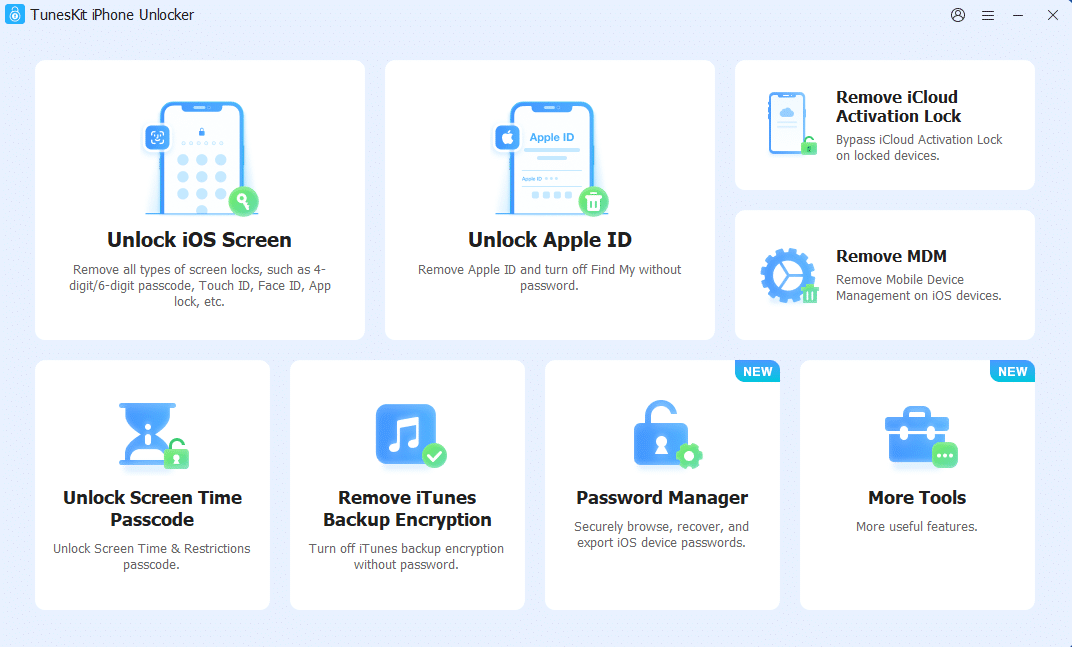
Step 1. Install and launch TunesKit iPhone Unlocker on your computer. Connect your locked iPad using a USB cable and choose Remove iCloud Activation Lock.
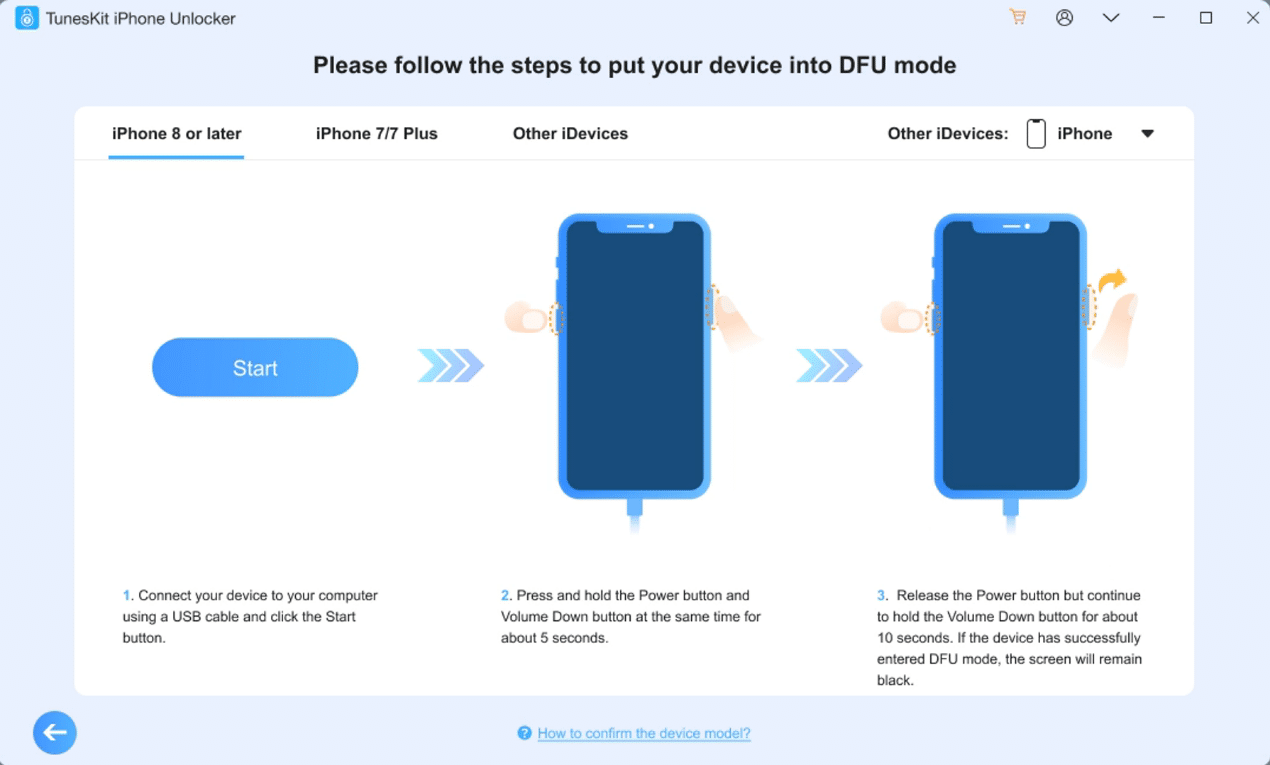
Step 2. Follow the on-screen instructions to put the device into DFU mode. Once entering, TunesKit will automatically start removing Activation Lock.
Step 3. Wait for the process to finish, then set up your iPad.
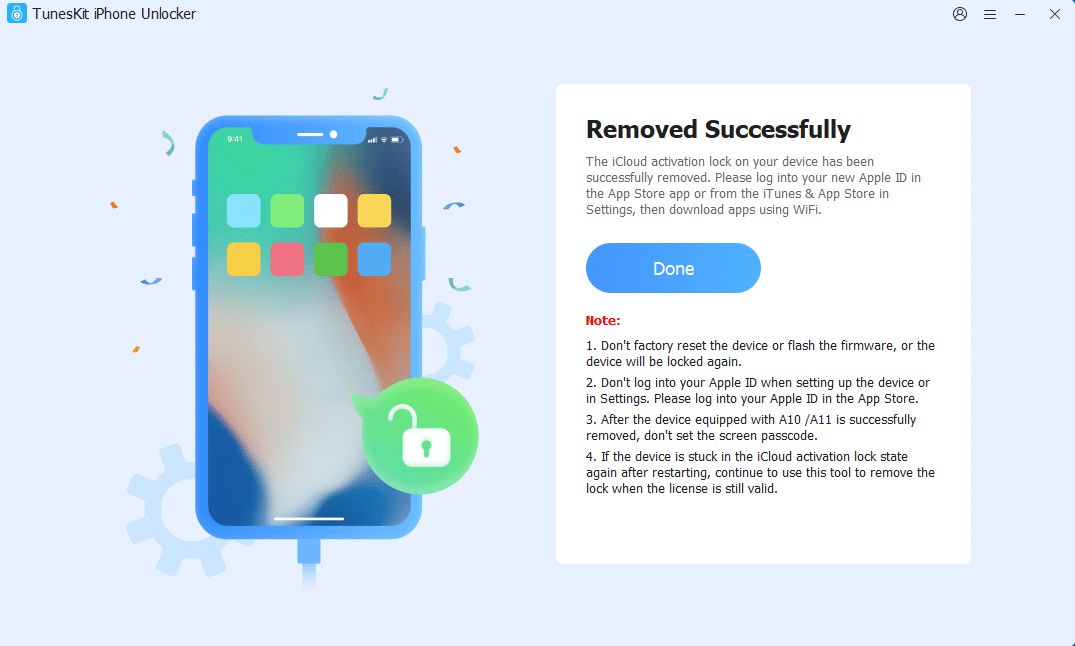
Note: Supported devices and available functions may vary depending on the iPad model and iPadOS version. Check compatibility before proceeding.
Fix 2: The Previous Owner Is Available
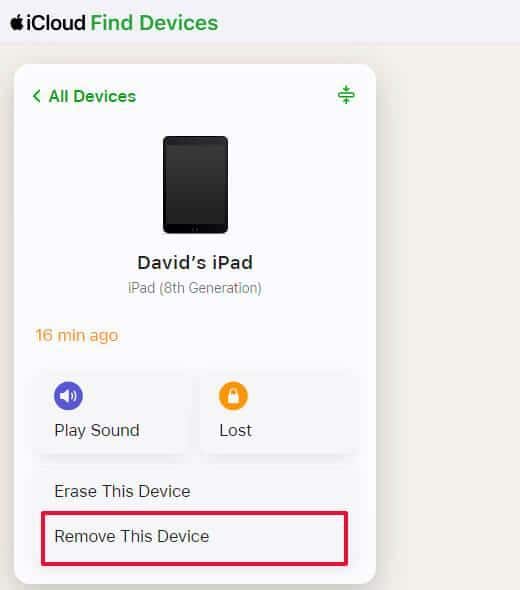
If you’re still in touch with the previous owner, Apple’s official recommendation is to have them remove the device from their Apple ID. This method doesn’t require any third-party software and is the safest option. The previous owner can remotely remove the device from their Apple account in just a few minutes.
Steps:
1. Ask the previous owner to sign in to iCloud.com with their Apple ID.
2. Open Find Devices.
3. Select the locked iPad.
4. Click Remove This Device (or Erase iPad first if necessary).
5. Restart the iPad and continue the setup process.
Once the device is removed from their account, Activation Lock disappears automatically.
Fix 3: Forgot Your Apple ID? Recover Your Account First
If the iPad belongs to you but you’ve simply forgotten your Apple ID or password, you may not need to bypass Activation Lock at all. Recovering your Apple Account is the safest and most reliable solution, as it preserves full access to your device and all Apple services.
Steps:
Step 1. Visit Apple’s iforgot.apple.com page.
Step 2. Enter the Apple ID associated with your locked iPad.
Step 3. Verify your identity using your trusted phone number, email address, or another trusted Apple device.
Step 4. Reset your Apple ID password by following the on-screen instructions.
Step 5. Restart your iPad, sign in with your updated Apple ID credentials, and complete the activation process.
Fix 4: You Have the Original Receipt
If you’re the legitimate owner but forgot your Apple ID or no longer have access to the account, Apple may be able to help.
Prepare documents such as:
- Original purchase receipt
- Serial number or IMEI
- Government-issued ID (if requested)
Then contact Apple Support or visit an Apple Store. After verifying ownership, Apple may remove the Activation Lock for you.
This method is completely official but only works if you can prove ownership.
What Doesn’t Work for Removing Activation Lock (Avoid These Scams)
When searching online, you’ll find countless websites claiming they can remove Activation Lock instantly. Many of them are misleading or even fraudulent.
Avoid these common scams:
Fake IMEI Unlock Services
Some websites promise to unlock your iPad simply by entering its IMEI number and paying a fee. Most never deliver the promised service.
“Free Activation Lock Removal” Downloads
Many free tools are outdated, incompatible with current iPadOS versions, or contain malware.
Unknown Online Unlock Services
If a service guarantees a 100% permanent Activation Lock bypass without asking for device information or ownership verification, it’s likely too good to be true.
Stick with trusted software, Apple’s official support, or the previous owner’s assistance whenever possible.
FAQs
1. Can I bypass Activation Lock without the previous owner?
Yes. For supported iPad models and iPadOS versions, TunesKit iPhone Unlocker may offer a solution when you can’t get assistance from the previous owner.
2. Does factory resetting an iPad remove Activation Lock?
No. Activation Lock is linked to the Apple ID stored on Apple’s servers, so resetting the device won’t remove it.
3. Can I bypass Activation Lock if I forgot my Apple ID?
Yes. If the iPad belongs to you, the best option is to recover your Apple ID through Apple’s account recovery service. If recovery isn’t possible, a professional tool like TunesKit iPhone Unlocker may provide an alternative solution.
4. Is bypassing Activation Lock legal?
Bypassing Activation Lock should only be done on a device you legally own or have permission to access. Attempting to unlock a lost or stolen device may violate local laws.
Final Recommendation
If your iPad is locked to owner, the best solution depends on your situation. When possible, ask the previous owner to remove the device from their Apple ID. If you have valid proof of purchase, Apple Support is the safest option.
However, if the previous owner is unavailable and you need a practical solution, TunesKit iPhone Unlocker offers one of the easiest ways to bypass Activation Lock without an Apple ID on supported devices. By choosing the right method and avoiding online scams, you can save time and safely regain access to your iPad.