

Pokémon GO continues to attract millions of players worldwide, but not everyone has the time or ability to travel long distances to catch rare Pokémon, join global events, or participate in raids. That’s why GPS spoofing tools remain popular among iPhone users.
The challenge is finding a reliable solution. Some spoofers are difficult to use, while others are expensive or lack useful features. To help you choose the right one, we tested the most popular Pokémon GO spoofer software for iOS based on ease of use, compatibility, movement options, stability, and overall value.
How to Choose the Best iOS Pokémon GO Spoofers
Before downloading any GPS spoofing tool, consider the following factors:
- Compatibility with the latest iOS versions and iPhone models
- No jailbreak requirement
- Ease of setup and use
- Joystick and simulate movement features
- Stability during gameplay
- Pricing and overall value
- Cooldown timer and safety
Top 4 Pokémon GO Spoofers for iOS
1. PoKeep Location Changer
PoKeep Location Changer is the best overall Pokémon GO spoofer for iOS thanks to its balance of affordability, rich features, and ease of use. It includes almost every tool a Pokémon GO player needs, and provides a free trial for users to test its features.
Key Features:
- One-click Teleport to anywhere and 360° GPS Joystick for smooth manual movement.
- Supports Two-Spot and Multi-Spot modes with customizable speeds for more realistic movement.
- Save favorite routes and access your location history for quick revisits.
- GPX Route Import and Export to use community-created Pokémon GO routes.
- Supports up to 10 iOS and Android devices with one license.
- Bluetooth & Wi-Fi connection after initial setup.
- Works with the latest iOS versions without jailbreak.
Overall, PoKeep offers the strongest feature set in this comparison while remaining one of the most affordable options. For players who spoof regularly, it delivers the best value for money.
2. iMyFone AnyTo
iMyFone AnyTo is well known for its beginner-friendly interface and reliable GPS spoofing performance. It works with thousands of location-based apps and provides stable teleporting for Pokémon GO.
Key Features:
- One-click GPS teleport.
- Virtual joystick movement.
- Two-point and multi-point route simulation.
- Adjustable movement speed.
- AI-powered anti-detection technology.
- Supports up to 5 mobile devices.
iMyFone AnyTo has been one of the most recognizable GPS spoofing tools for several years. Although AnyTo is easy to use, its monthly subscription is noticeably more expensive and increases with the number of supported devices.
3. Tenorshare iAnyGo
Tenorshare iAnyGo focuses on advanced movement customization. Players can create complex walking routes and fine-tune travel speeds for more realistic gameplay.
Key Features:
- Teleport Mode and Joystick control.
- Customized multi-stop routes.
- Walking, cycling, and driving speed simulation.
- Flexible movement planning.
- Supports up to 5 iOS devices per standard license.
- Supports both PC-based version and mobile app version
iAnyGo is a capable option for experienced users. While the feature set is comprehensive, casual users may not fully utilize all of the advanced options.
4. Dr.Fone Virtual Location
Dr.Fone Virtual Location is part of Wondershare’s larger mobile toolkit. It covers the core spoofing functions and integrates well with other Dr.Fone utilities.
Key Features:
- One-click GPS teleport.
- Virtual joystick movement.
- Multi-spot route simulation.
- Adjustable movement speed.
- Compatible with iOS and Android.
- Works with multiple location-based apps.
Dr.Fone offers an all-in-one experience with reliable teleporting, joystick control, route simulation, while lacking a mobile app version for iPhone. As part of Wondershare’s larger toolkit, it is especially appealing to users who already rely on Dr.Fone for other mobile management tasks.
How to Spoof Pokémon GO with a Location Spoofer
The usage methods of most Pokémon Go spoofers are similar. Here, we take PoKeep Location Changer as an example.
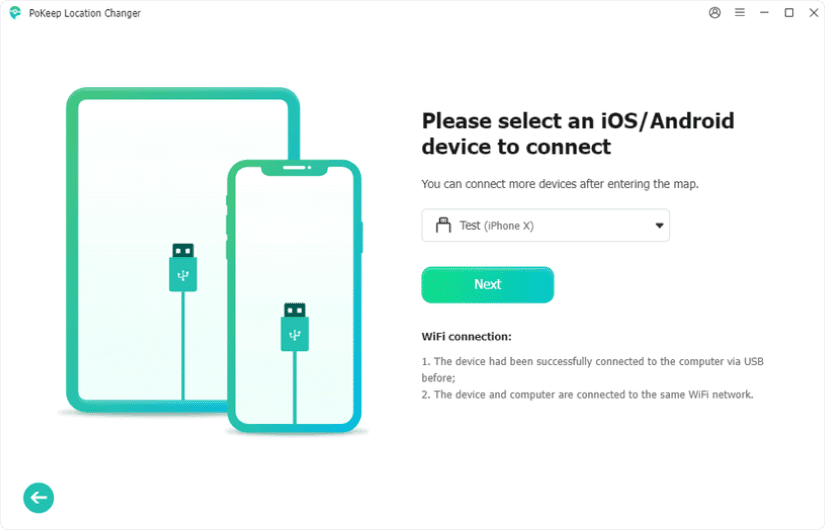
Step 1. Launch PoKeep Location Changer and Connect Your Device
Install PoKeep Location Changer on your Windows or Mac computer. Open the program, then connect your iPhone using a USB cable or Wi-Fi connection.
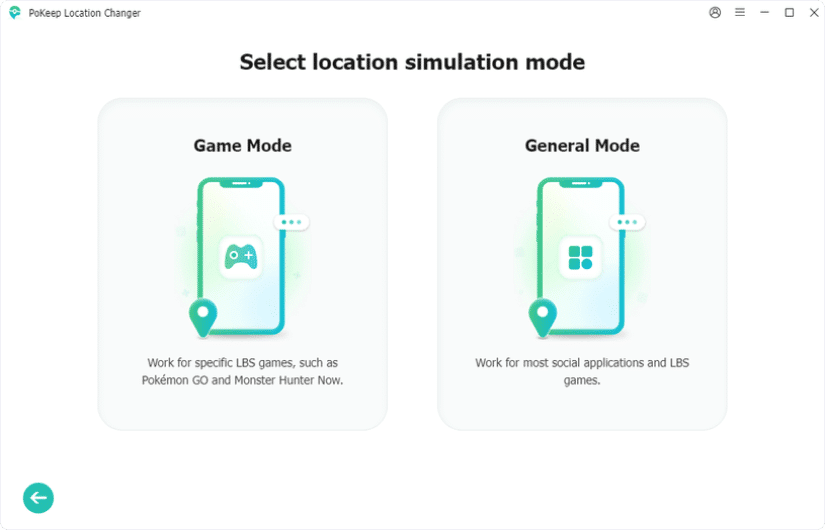
Step 2. Choose Game Mode
Click Next, then select Game Mode. Follow the on-screen instructions to complete the required setup.
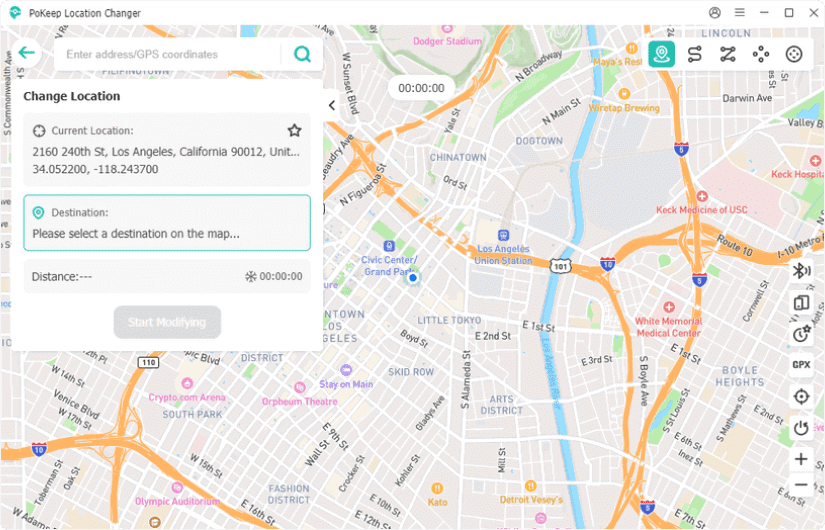
Step 3. Change Your GPS Location
After entering the map, enter the location or coordinates where you’d like to play Pokémon GO, then click Search to find it on the map. Click Start Modifying to change your iPhone’s GPS location. Your device location will be updated to the selected destination instantly.
Step 4. Open Pokémon GO and Simulate Movement
Launch Pokémon GO on your iPhone. Your in-game character will appear at the new location. You can then use Joystick Mode or Multi-Spot Movement to simulate natural movement, catch Pokémon, spin PokéStops, and participate in raids without physically traveling.
Tip: To reduce the risk of account warnings, avoid teleporting repeatedly over long distances in a short period. Follow Pokémon GO’s cooldown guidelines and use realistic walking speeds whenever possible.
Useful Tools for Pokémon GO Players
Besides a reliable location spoofer, several companion tools can improve your gameplay. A Pokémon GO IV calculator helps determine whether a Pokémon is worth investing in, while a Pokémon GO evolution calculator predicts the CP after evolution so you can better manage Stardust and Candy. Combining these tools with a safe location spoofer allows you to catch, evaluate, and evolve Pokémon more efficiently.
FAQs
1. What is the best Pokémon GO spoofer for iOS?
For most users, PoKeep Location Changer offers the best combination of features, performance, and affordability. It supports teleporting, joystick movement, route simulation, and the latest iOS and Android versions without requiring a jailbreak.
2. Can you spoof Pokémon GO on iPhone without jailbreaking?
Yes. Modern GPS spoofing tools such as PoKeep Location Changer, iMyFone AnyTo, Tenorshare iAnyGo, and Dr.Fone Virtual Location all allow location changes without jailbreaking your iPhone.
3. Is Pokémon GO spoofing safe?
No spoofing method is completely risk-free because it violates Pokémon GO’s Terms of Service. Following cooldown rules, avoiding excessive teleporting, and using realistic movement patterns can help reduce the chance of account penalties.
Conclusion
Choosing the right Pokémon GO spoofer is about more than simply changing your GPS location. Ease of use, stability, movement options, and safety all play an important role. Among the tools we tested, PoKeep Location Changer provides the best overall experience thanks to its rich feature set, user-friendly interface, and built-in cooldown timer that helps users spoof more responsibly. While iMyFone AnyTo, Tenorshare iAnyGo, and Dr.Fone Virtual Location are all capable alternatives, PoKeep delivers nearly everything most players need without the premium price tag, making it our top recommendation for iOS users.