

Many people can describe the music they want long before they can build it. They know the emotional temperature, the pacing, maybe even the image the song should support, but they cannot easily translate that into melody, arrangement, and vocal choices. That translation gap is where AI Music Generator becomes genuinely useful.
The value is not just automation. The value is conversion: turning descriptive language into something audible enough to evaluate. In my observation, ToMusic AI works best when you see it as a bridge between intention and arrangement, especially during early drafting when ideas are still unstable.
Why Language To Sound Is Harder Than It Looks
When users say they want “cinematic,” “warm,” or “energetic,” those words can point to very different musical outcomes. The challenge in AI music generation is not only model capability; it is semantic ambiguity. If your language is fuzzy, your output often becomes fuzzy too.
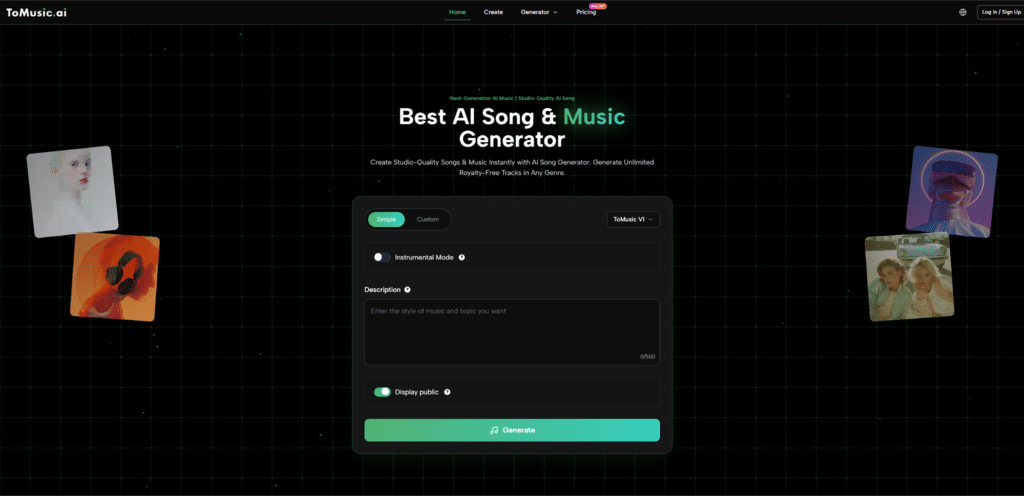
ToMusic AI helps by giving users a flow that supports incremental control. You can start with a simple request, then move to custom inputs and model selection when you need more precision. That progression is practical because most users do not know exactly how much control they need until they hear the first result.
The Real Skill Is Prompting For Arrangement Behavior
A good prompt is not a list of random adjectives. It is a compact arrangement brief. In my testing style, stronger prompts usually answer these questions:
- What is this music for?
- Should it be vocal or instrumental?
- What tempo feeling fits the use?
- What instrument colors matter most?
- What emotional arc should it sustain?
This turns prompting into design rather than guessing.
How ToMusic AI Builds A Usable Creative Sequence
ToMusic AI describes a sequence that includes choosing Simple or Custom mode, selecting a model version, entering a text description or lyrics, and generating the track. This sequence matters because it separates three different decisions that users often mix together: control level, engine choice, and content input.
Mode Choice Determines How Much You Direct
Simple mode is helpful when you want broad translation from idea to sound. Custom mode is more useful when you want to define lyrics or shape the output with stronger constraints. Neither is universally better. They serve different stages of the same process.
Model Choice Determines How You Judge The Output
Because ToMusic AI offers multiple versions (V1 through V4), the same prompt may need different expectations depending on the selected model. A faster version may be ideal for rough exploration. A more advanced version may be better for vocal nuance or longer-form output.
This is a useful feature not only technically, but cognitively. It encourages users to align expectations with intent instead of applying one quality standard to every generation task.
A practical habit I recommend is using Text to Music AI for prompt stress testing: keep the concept constant, vary one parameter at a time, and compare how the arrangement changes. This teaches you more about prompt language than rewriting everything at once.
Custom Lyrics Change The Type Of Control Available
When you use custom lyrics, the system is no longer only inventing music from descriptive text. It is also interpreting phrasing, emphasis, and section flow. ToMusic AI references support for structured lyric tags such as verse and chorus markers, which can help users communicate form more clearly.
That makes the platform more useful for lyric-first creators who need to hear arrangement possibilities before committing to further production work.
A Four-Step Workflow Based On The Official Path
To stay grounded in the platform’s actual flow, this version keeps the process simple and repeatable.
Step One Choose Simple Or Custom By Draft Stage
Use Simple for idea exploration and Custom for lyric-driven or more controlled generation tasks.
Step Two Select A Model For The Job
Pick a model version based on your priority in that moment: speed, richer harmonies, stronger vocals, or longer composition range.
Step Three Enter Prompt Or Lyrics With Arrangement Signals
Provide a text description or custom lyrics. Include clear cues for mood, tempo, instrumentation, and vocal/instrumental preference.
Step Four Generate Then Refine The Language
Listen to the result and refine your wording before changing everything else. Often, better language creates better outputs faster than random retries.
Where ToMusic AI Helps Users Learn Faster
One understated benefit of tools like ToMusic AI is educational. By hearing how prompt changes affect arrangement outcomes, users gradually learn to think more musically even if they do not use traditional production tools.
Comparison Table For Prompt To Arrangement Translation
| User Challenge | Without AI Generation | With ToMusic AI | Learning Benefit |
| Vague emotional idea | Hard to evaluate quickly | Hear a draft from text or lyrics | Better prompt specificity over time |
| Unsure genre direction | Requires manual demos | Compare generated directions fast | Faster stylistic decision-making |
| Lyric phrasing uncertainty | Needs composition work first | Hear lyrics in song context sooner | Better lyric revisions |
| Arrangement imagination gap | Abstract planning only | Audible candidate output | Stronger creative feedback loop |
Limits That Keep The Process Honest
ToMusic AI can accelerate translation from language to sound, but it does not eliminate uncertainty. Some outputs will miss the intended tone, and quality still depends on how clearly the user communicates the goal. Multiple generations are often necessary.
What Usually Causes Mismatch Between Prompt And Result
The most common mismatches are not mysterious:
- Prompt describes mood but not tempo
- Prompt names genre but not texture
- Lyrics are conceptually strong but rhythmically uneven
- User changes too many variables at once between retries
These are normal issues and often improve with a more controlled iteration method.
Why A Bridge Tool Still Needs Human Taste
A bridge only helps you cross. It does not decide where you should go. That is still the creator’s role. In my view, the best use of ToMusic AI is to shorten the distance between idea and evaluation while keeping human taste at the center of the process.
For creators who think in words before they think in notes, that is a meaningful capability. It makes music direction easier to test, easier to compare, and easier to refine into something that actually fits the project you are trying to build.