

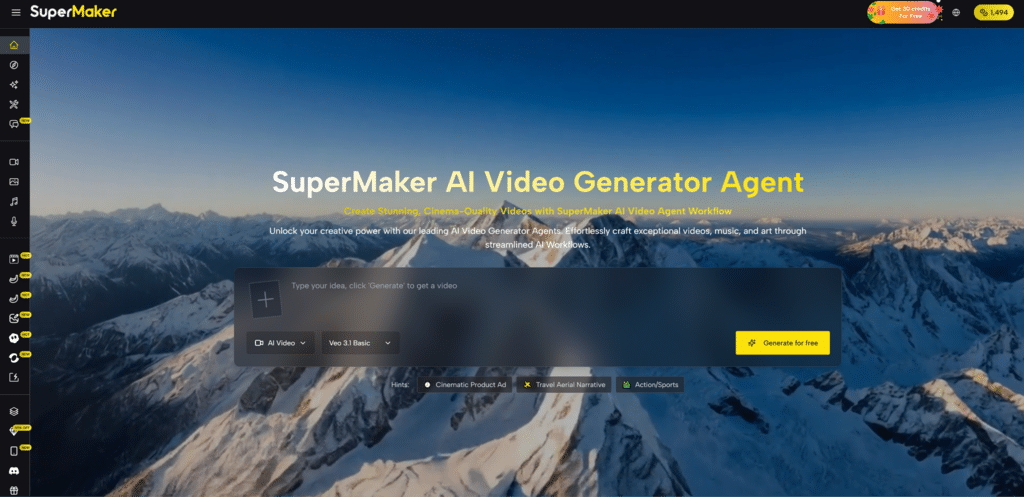
For many creators, the hardest part of video production is not imagination but coordination. A simple idea often turns into a chain of disconnected tasks: writing a script, finding visuals, matching voice, adding music, and then trying to make the whole thing feel coherent. That friction is exactly why platforms built around an AI Video Generator Agent feel increasingly relevant. Instead of treating video generation as a single prompt-and-output trick, this approach frames creation as a connected workflow where planning, visual generation, audio, and assembly belong to the same process.
The shift matters because expectations around AI video have changed. Early tools were often impressive in isolation but awkward in practice. They could generate a short clip, yet left users to solve the rest elsewhere. In my view, the more interesting development is not just better rendering quality, but the emergence of systems that reduce tool-switching and make the whole path from idea to publish more navigable. That is where SuperMaker stands out: not as a one-button promise, but as a platform trying to turn fragmented creative tasks into a more usable sequence.
Why Unified Creation Feels More Important Now
What makes modern AI video platforms useful is no longer just whether they can animate from text. It is whether they can help a creator move from rough intent to usable output without losing momentum. SuperMaker appears designed around that broader requirement. Its structure connects video generation with image creation, voice, music, and chat-based refinement, which suggests a workflow mindset rather than a single-function interface.
Fragmented Tools Often Break Creative Momentum
A common problem in AI Video Generator is interruption. You generate visuals in one place, voice in another, music in a third, then spend more time exporting and recombining than actually shaping the piece. Even when each output is decent, the process feels mechanical. A unified environment lowers that friction. It gives users one place to test ideas, revise direction, and keep assets aligned.
A Workflow Model Changes User Expectations
This also changes how people think about “generation.” The goal is no longer only to make a clip appear. It is to build a sequence: concept, scene logic, audio mood, final delivery. In that context, a platform becomes valuable not merely because it is fast, but because it helps preserve continuity from first prompt to final output.
How SuperMaker Organizes The Creative Process
The platform presents video as the center of a wider creation system. Video generation is the main attraction, but it sits alongside image tools, voice tools, music tools, and an agent-style workflow idea. That combination suggests a model where the user is not forced to leave the environment each time the project needs one more component.
Video Sits At The Core Of The Platform
At the center is the video maker layer, which supports turning text descriptions into motion and also supports image-based video creation. That dual approach matters because not every project starts the same way. Some begin with a written concept. Others begin with a still image, visual reference, or product shot that needs to be animated.
Audio Is Treated As Part Of The Output
Another notable detail is that voice and music are not framed as side tools. They are part of the broader workflow. In practice, that means the platform is encouraging users to think in terms of finished media rather than isolated silent clips. For creators making explainers, short ads, social content, or concept scenes, that integration can be more meaningful than a purely visual upgrade.
Chat Guidance Adds Iterative Control
The chat layer is also worth noting. In many AI tools, refinement still feels parameter-heavy or hidden behind menus. A conversational layer can make iteration more intuitive, especially for users who know what they want aesthetically but do not want to manage every setting in a technical way. It shifts the interaction from configuration toward direction.
What The Official Workflow Actually Suggests
One of the strongest aspects of the platform is that its process is described clearly. Rather than hiding behind abstract claims, it outlines a sequence that is easy to understand. Based on the official flow, the experience can be understood in four steps.
Step One Starts With Prompt Direction
The process begins with a prompt. That sounds obvious, but the prompt here is more than a caption. It functions as the creative brief. A user describes a scene, product, atmosphere, or story idea, and that description becomes the starting signal for the system.
Step Two Generates Moving Visual Material
The next stage is generation. This is where the platform turns the prompt or uploaded source material into animated video content. Depending on the project, this may mean text-to-video or image-to-video. The important point is that the output is not treated as the endpoint of the project.
Step Three Enhances Voice And Music Layers
After visuals are created, the platform moves into enhancement. This stage introduces voice and background music, which makes the workflow feel closer to actual production than to simple video synthesis. In practical terms, this is where a rough generated clip begins to feel like a presentation, ad, or narrative asset.
Step Four Prepares The Piece For Publishing
The final stage is publishing, which includes adjustment and output. That last step matters because even with AI-generated material, creators still need a moment of control before export. A platform that acknowledges this step tends to feel more realistic about how content is actually made.
Where This Model Helps Different Kinds Of Users
The usefulness of this structure depends on the kind of work someone is doing. Not every creator needs the same level of control, but a workflow-based system tends to help people who care about speed without wanting to sacrifice cohesion.
| Aspect | Traditional Multi-Tool Process | SuperMaker Workflow Approach |
| Project start | Often split across separate apps | Begins from one prompt or source |
| Visual creation | Usually isolated from audio | Connected to later stages |
| Voice and music | Added manually in other tools | Positioned inside the workflow |
| Iteration | Requires repeated exporting | Can stay within one environment |
| Output mindset | Clip-first | Project-first |
| Best fit | Technical tinkerers with time | Creators seeking smoother production |
Why The Platform Feels Different In Practice
From a practical standpoint, the platform’s appeal is not only about feature breadth. It is about reducing context switching. In my observation, many creators do not abandon AI tools because the output is bad; they abandon them because the process becomes tiring. A system that keeps visual generation, enhancement, and export within one logic feels easier to return to.
It Supports Both Fast Tests And Broader Projects
That balance is important. A user can generate something quickly for social media, but the workflow language also hints at more structured use cases such as storyboarding, scene management, and more polished creative output. This gives the platform a wider range than a novelty generator.
Short Experiments Still Have Real Value
Quick content is not trivial. Marketers, creators, and small teams often need motion assets fast, especially when testing concepts. A platform that lowers the barrier to making first-pass video can be useful even before the final piece is produced elsewhere.
Longer Projects Benefit From Asset Continuity
For broader projects, the value shifts toward consistency. When visuals, audio, and revision all happen within one environment, there is a better chance the final result feels intentionally assembled rather than patched together from unrelated services.
What Users Should Keep In Mind Before Using It
A restrained evaluation also needs to include limitations. No AI video platform fully removes creative judgment. The system can reduce workload, but it does not eliminate the need for direction.
Prompt Quality Still Shapes Final Results
The output is still dependent on how well the user describes intent. Better prompts usually produce clearer scenes and more useful first drafts. Vague instructions can still lead to generic or uneven outputs, which means iteration remains part of the process.
Good Results May Require Multiple Generations
Even when the workflow is smooth, generation is not perfectly predictable. Some clips will land quickly, while others may need several tries. That is not unique to this platform, but it is worth stating plainly. Convenience has improved, yet selection and refinement still matter.
Unified Tools Do Not Replace Creative Judgment
A platform can help coordinate production, but it cannot decide what should be emphasized emotionally, visually, or narratively. Users still need to judge pacing, tone, and relevance. In that sense, the real value of the system is not that it replaces creators, but that it gives them a more manageable environment in which to direct the work.
What This Signals For AI Video Going Forward
The broader significance of SuperMaker is that it reflects a more mature stage of AI creation. The market is moving away from isolated demos and toward coordinated production environments. That shift is subtle, but important. It suggests that the next wave of useful tools may not be defined only by who has the most dramatic sample clip, but by who can make the overall creative process easier to repeat.
For users trying to understand where AI video is heading, that may be the real takeaway. The future of these platforms is likely not just sharper motion or faster rendering. It is the design of systems that help people move from idea to publish without constantly rebuilding their workflow. Seen that way, SuperMaker is less interesting as a spectacle and more interesting as a signal of how AI creation is becoming operational rather than experimental.