

Family photographs are some of the most irreplaceable things we own — faded, yellowed, or cracked with age, but full of people and moments that matter deeply. For years, restoring those old prints meant paying a professional lab or spending hours in Photoshop. Now, tools like Nano Banana AI have quietly changed what’s possible for anyone willing to try.
I. What AI Photo Restoration Can Actually Fix
Before you upload anything, it helps to know what AI restoration genuinely handles well — so you can set realistic expectations and get the best results.
- Yellowing and color cast: AI models can neutralize the brownish-yellow tint that forms on aged prints and restore more natural tonal balance across the whole image.
- Blurriness and lost detail: Soft or out-of-focus areas — especially faces — can be sharpened by the model reconstructing edges and textures based on learned visual patterns.
- Scratches, dust spots, and creases: Physical damage like fold lines, water stains, and surface scratches can be detected and filled in without affecting the surrounding image.
- Black-and-white colorization: For monochrome photos, the AI predicts contextually appropriate colors — skin tones, sky, clothing, foliage — based on scene content rather than random guessing.
If your photo has all of these problems at once, that’s fine. A single generation pass can address multiple types of damage simultaneously.
II. How AI Photo Restoration Actually Works
AI-based restoration isn’t magic, but it does something genuinely impressive: it learns what a face, fabric, or outdoor scene is supposed to look like, then fills in what degradation has erased.
- Noise and grain removal: The model identifies random pixel variation caused by film grain or scan artifacts and smooths them without blurring real edges.
- Detail reconstruction: Edges, facial features, and textures are sharpened by referencing trained patterns from millions of real high-resolution images.
- Colorization: For black-and-white photos, the AI predicts contextually appropriate colors — sky, skin, clothing — based on scene content and historical visual data.
The result isn’t always perfect, but for the average family photo, the difference between a faded scan and an AI-restored version is striking. It can feel like seeing someone’s face clearly for the first time.
III. What Makes Banana AI a Strong Choice for This
Not every image tool handles old photo restoration with the same care. Banana AI — as part of the Kimg AI toolkit — is built specifically for photorealistic image transformation, which makes it well suited for delicate restoration work.
- Photorealistic output: The model is trained for hyper-realistic detail rendering, so restored faces don’t come out looking painted or over-processed.
- Style-aware reconstruction: It preserves the feel of the original era while improving visual quality, so a 1960s family portrait still looks like the 1960s.
- Reference image support: You can upload up to 4 reference images, which is useful if you’re trying to match a person’s restored appearance across multiple old photos.
IV. Other Models You Can Test on the Same Site
One practical advantage of using Kimg AI is that you don’t have to commit to a single model. Several well-known AI models are accessible from the same account.
- Seedream: Extremely fast generation, good for quick previews before committing to a full-quality restoration pass.
- Flux: Handles context-aware editing well — useful if you want to repair one part of a photo without touching the rest.
- GPT Image 2 and Grok Imagine: Strong alternatives for certain prompt styles or creative edits layered on top of a restoration.
Being able to switch between these models without logging into separate services saves time, especially when testing which output looks most natural for a particular old photo.
V. From Restored Photo to Moving Memory: Veo 3
Once you have a restored, high-quality version of an old photo, Kimg AI offers something that goes a step further — animation via Veo 3.
- Image-to-video conversion: Upload your restored photo, and Veo 3 can animate it into a short cinematic clip with natural motion.
- Native audio generation: The model adds synchronized ambient sound or effects automatically, without needing a separate audio tool.
- Frame control: You can specify starting and ending frames, giving you some control over how the animation unfolds.
For family reunions, memorial slideshows, or simply sharing with relatives who live far away, a moving version of an old photo carries an emotional weight that a static image can’t quite match.
VI. Getting Started Free — and How Far Credits Take You
Kimg AI has a credit-based system, and the free tier is genuinely usable for photo restoration work — not just a teaser.
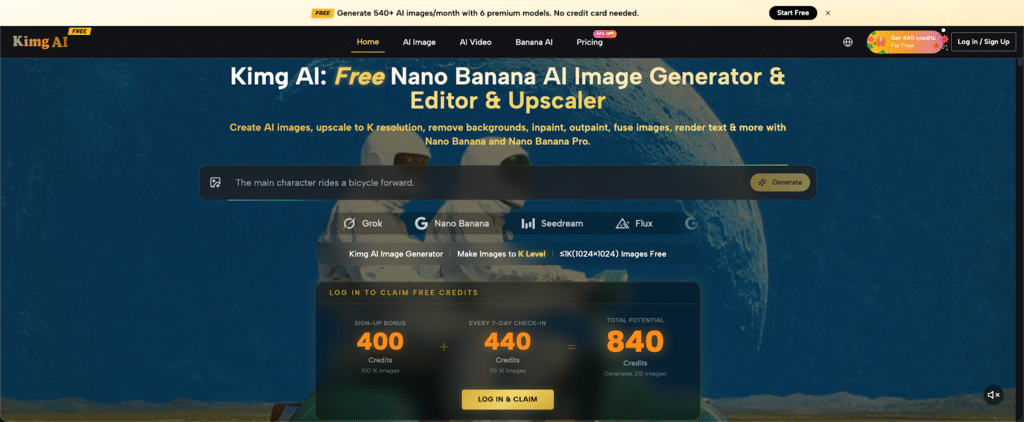
- Sign-up bonus: New users receive 400 credits immediately upon registration, with no payment required.
- Weekly check-in reward: Log in every day for 7 consecutive days and collect an additional 440 credits — bringing your starting total to 840 credits.
- What that gets you: With 840 credits, you can generate over 200 images using the advanced image models, which is more than enough to restore a full collection of family photos.
- Ongoing free access: After the first week, continuing the daily check-in habit gives you 440 credits every week — roughly 110 free image generations per week, indefinitely.
The credit structure means you can restore dozens of old photos without spending anything in the first weeks of use. And the weekly sign-in system rewards regular users without requiring a subscription.
VII. A Simple Workflow for Restoring a Faded Family Photo
If you’ve never used an AI image tool for restoration before, the process on Kimg AI is straightforward. Here’s a basic approach:
- Scan your photo at the highest resolution your scanner allows — at least 600 DPI for prints, 1200 DPI for small originals like wallet-sized photos.
- Upload the scan to Nano Banana on Kimg AI and write a prompt describing what you want: “Restore faded family portrait, sharpen facial details, correct yellowing, natural skin tones.”
- Select your model — Nano Banana for photorealistic quality, or Seedream if you want a fast preview first.
- Review and iterate — if the first result overcorrects or misses something, adjust your prompt and regenerate. You have the credits to experiment.
- Animate if desired — once satisfied with the restored image, use Veo 3 to create a short video version using the credits you’ve accumulated.
The whole process from scan to finished restoration can take under ten minutes once you’re familiar with the interface.

Conclusion
There’s something quietly powerful about looking at an old photograph and really seeing the people in it — clearly, in color, maybe for the first time. These images aren’t just pixels. They’re proof that someone lived.
Technology can’t recover lost time. But it can recover lost images — and when those images belong to your family, that’s enough reason to start. The photos have waited long enough.