


Your VPN’s green “Connected” badge isn’t a hush switch—it’s only the starting line for risk. A 2025 study of 129 000 daily users found native IPv6 leaking from up to 57 percent of people on v4-only VPNs. To keep you off that list, we spent a month auditing two dozen services and trimmed the field to nine standout leak-detection tools. Each one shows—in seconds—whether IPv4, IPv6, DNS, or WebRTC traffic is escaping the tunnel, plus what to fix before your next session.
Quick answer: which tools should you reach for first?
Pressed for time? Start with TorGuard VPN Leak Test. Its one-click page checks DNS and WebRTC in under five seconds.
For an all-in-one deep dive, open IPLeak.net and scroll to the torrent pane; it packs more leak vectors onto one screen than any other browser test.
Torrent every day? Top10VPN Do I Leak reveals the exact IP your client shares with the swarm.
Need a tracker-free page that stores nothing? Mullvad Connection Check keeps the result local and skip-loads third-party scripts.
Running audits or CI pipelines? The open-source ExpressVPN Leak Testing Suite stress-tests crashes, network flips, and packet-capture routines for lab-grade proof.
How we scored each leak tester
To rank the nine finalists, we compared our checklist with two trusted sources:
- The Anti-Malware Testing Standards Organization VPN guidance (IPv4, IPv6, DNS, WebRTC, and transition events).
- ExpressVPN public leak-testing suite, which stresses crashes and reconnects that browser pages often miss.
Those references produced a six-point rubric:
- Coverage breadth (25%): IPv4, IPv6, DNS, WebRTC, torrent, and live reconnection
- Method clarity (20%): Raw evidence, plus clear pass / warn / inconclusive labels
- Privacy posture (15%): Data retention, cookies, and third-party calls
- Ease of use (20%): One-click start, mobile layout, minimal jargon
- Maintenance cadence (10%): HTTPS hygiene and recent browser updates
- Automation extras (10%): API, CLI, or JSON output for repeat tests
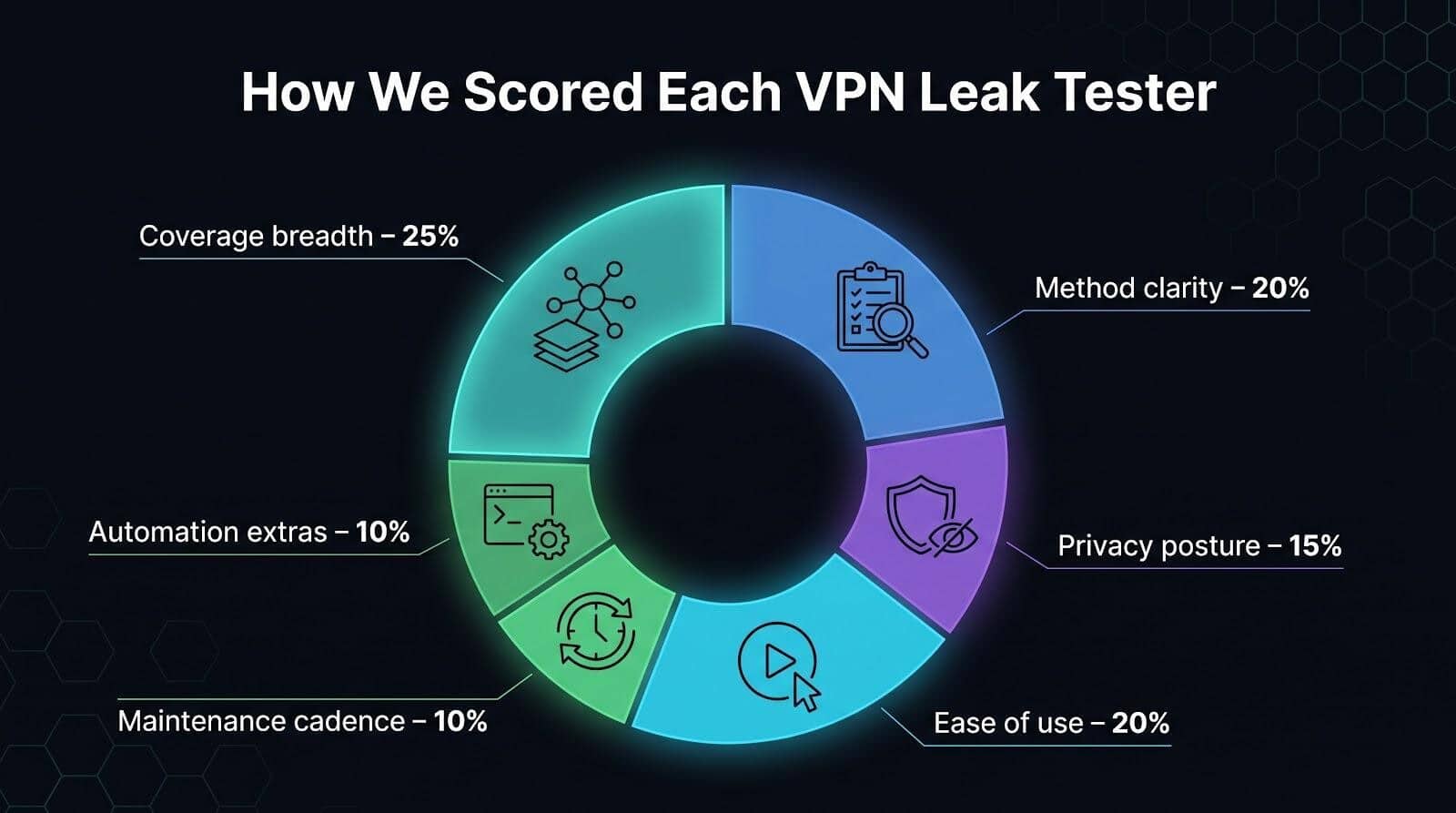
Each tool earned 0–10 points per factor. We applied the weights and normalised the scores to 100. None reached a perfect mark; no single page covers every transition and publishes a full privacy audit, yet the framework lets you verify every score yourself.
How to run a leak test that tells you something
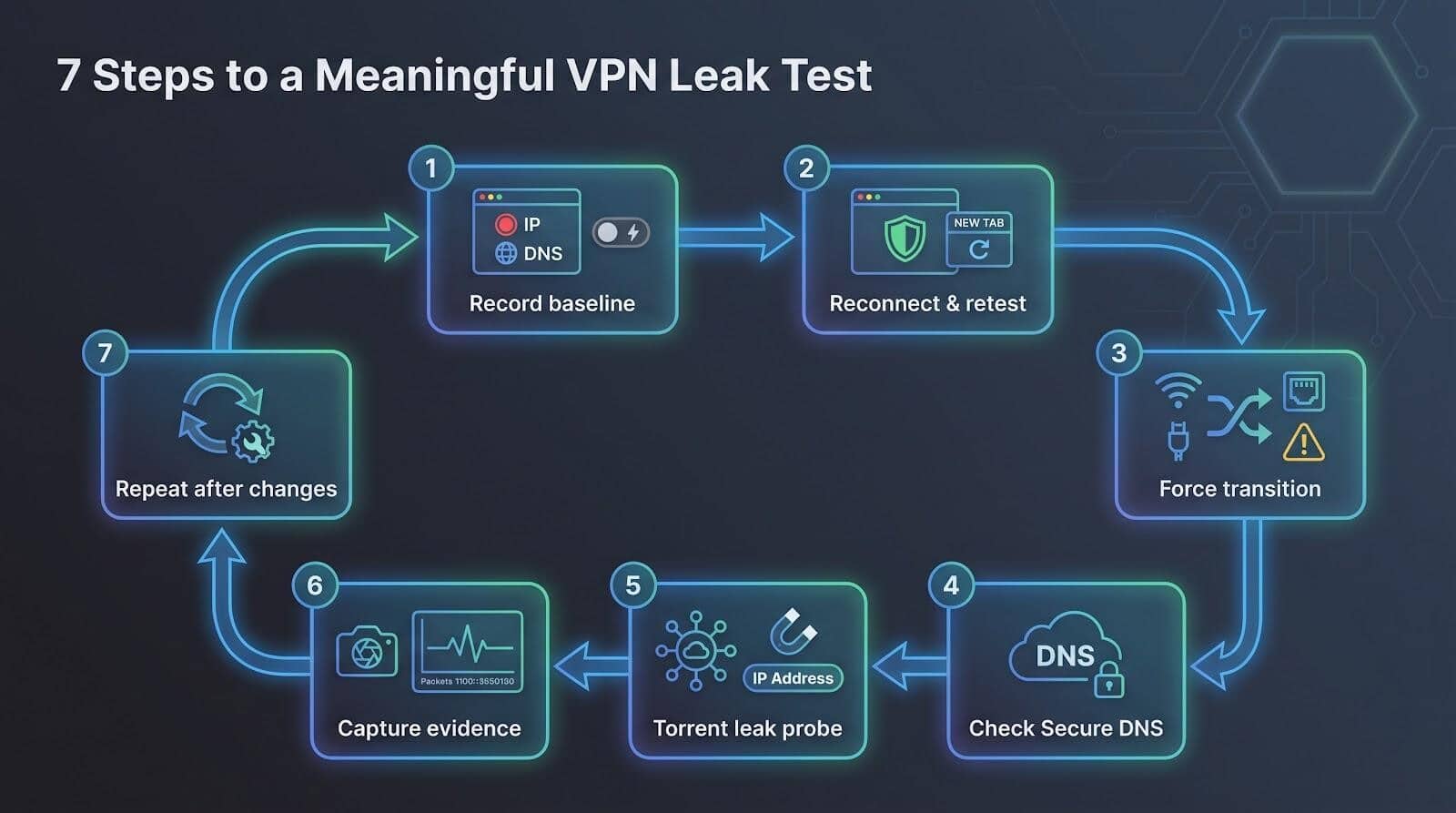
Follow these seven quick checks; each one builds evidence you can replay or share with support.
- Record a baseline. Disconnect the VPN, open a leak checker, and save the public IPv4, IPv6, DNS resolvers, and WebRTC candidates you see.
- Reconnect and retest in a new tab. Some browsers keep old sockets alive. A fresh window avoids false negatives. Look for a new IPv4 in the right country and note whether IPv6 is absent (blocked) or replaced (tunnelled).
- Force a transition. Unplug Ethernet or toggle Wi-Fi off and on. AMTSO flags this as a must-run scenario. Reload the page; your ISP address should not reappear.
- Check browser Secure DNS. If Chrome’s Automatic mode or Firefox’s “Increased” level surfaces Google or Cloudflare resolvers, adjust settings before blaming the VPN.
- Run a torrent leak probe. Drop the magnet link from Do I Leak or IPLeak into your client and compare the swarm IP with the browser result; they should match.
- Capture evidence. Take screenshots or a short Wireshark trace; timestamps help providers reproduce issues.
- Repeat after big changes. New VPN app version, OS update, or different network? Rerun steps 1–6 to catch fresh gaps.
VPN leak-test comparison at a glance
Numbers matter only if you can scan them quickly. The matrix below shows how 9 shortlisted tools cover 7 common leak vectors.
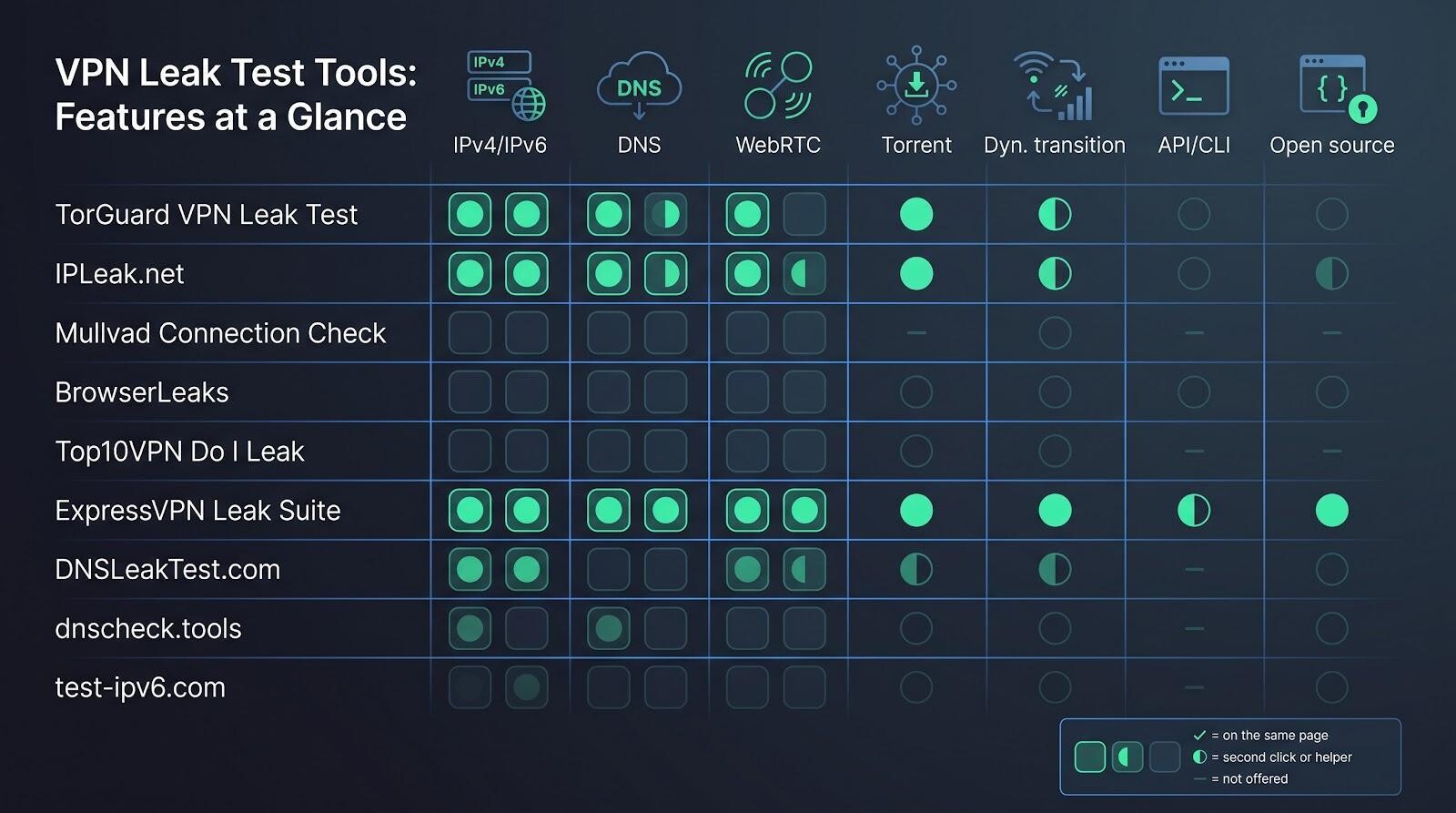
Symbol key: ✓ = on the same page · ◐ = needs a second click or helper script · — = not offered
| Rank | Tool | IPv4 / IPv6 | DNS | WebRTC | Torrent | Dynamic transition | API / CLI | Open source |
| 1 | TorGuard VPN Leak Test | ✓ / — | ✓ | ✓ | — | — | — | — |
| 2 | IPLeak.net | ✓ / ✓ | ✓ | ✓ | ✓ | — | ◐ | — |
| 3 | Mullvad Connection Check | ✓ / — | ✓ | ✓ | — | — | ✓ | — |
| 4 | BrowserLeaks | ✓ / ✓ | ✓ | ✓ | — | — | — | — |
| 5 | Top10VPN Do I Leak | ✓ / ✓ | ✓ | ✓ | ✓ | — | — | — |
| 6 | ExpressVPN Leak Suite | ✓ / ✓ | ✓ | ✓ | ✓ | ✓ | ✓ | ✓ |
| 7 | DNSLeakTest.com | ✓ / — | ✓ | — | — | — | — | — |
| 8 | dnscheck.tools | ✓ / ✓ | ✓ | — | — | — | ✓ | ✓ |
| 9 | test-ipv6.com | — / ✓ | ◐ | — | — | — | — | ✓ |
Three quick data points:
- Torrent testing appears in only 3 of 9 tools: IPLeak, Do I Leak, and the ExpressVPN suite.
- Full IPv6 checks are absent in over half the field, a concern because a 2025 study of 129 000 users found native IPv6 leaks for up to 57 percent of people on v4-only VPNs.
- Only ExpressVPN’s toolkit, dnscheck.tools, and test-ipv6.com publish source code, a must-have for auditors.
Keep this cheat-sheet nearby as we walk through each tool; you’ll know when a missing ✓ is critical and when a niche specialist still earns its spot.
1. TorGuard VPN Leak Test: best for a lightning-fast first pass
Need a yes-or-no answer in under five seconds? Open TorGuard’s browser page, the VPN Leak Test | IP DNS WebRTC Leak Checker, then click “Start DNS Leak Test” or “Start WebRTC Test”; results refresh on the same screen so you can spot leaks before the coffee cools.
- IP + DNS – runs a combined scan and lists every resolver that answered.
- WebRTC – reveals any media routes your browser still exposes.
What you’ll see:
- Detected IPv4 address and hosting ASN
- DNS servers with country flags
- WebRTC candidates, highlighted red if they differ from the main IP
Trade-offs
The page skips native IPv6, torrent checks, and reconnection scenarios; its privacy note is brief, so use TorGuard for a first-pass sanity check, then move to IPLeak or the ExpressVPN suite for deeper audits.
Bookmark it if you switch servers often, juggle multiple browsers, or help friends confirm “Is my VPN actually on?” before the coffee cools.
2. IPLeak.net: best all-in-one diagnostic dashboard
Need to inspect six leak vectors—IPv4, IPv6, DNS, WebRTC, torrent, and alternate ports—without hopping between pages? IPLeak.net stacks them in one continuous view.
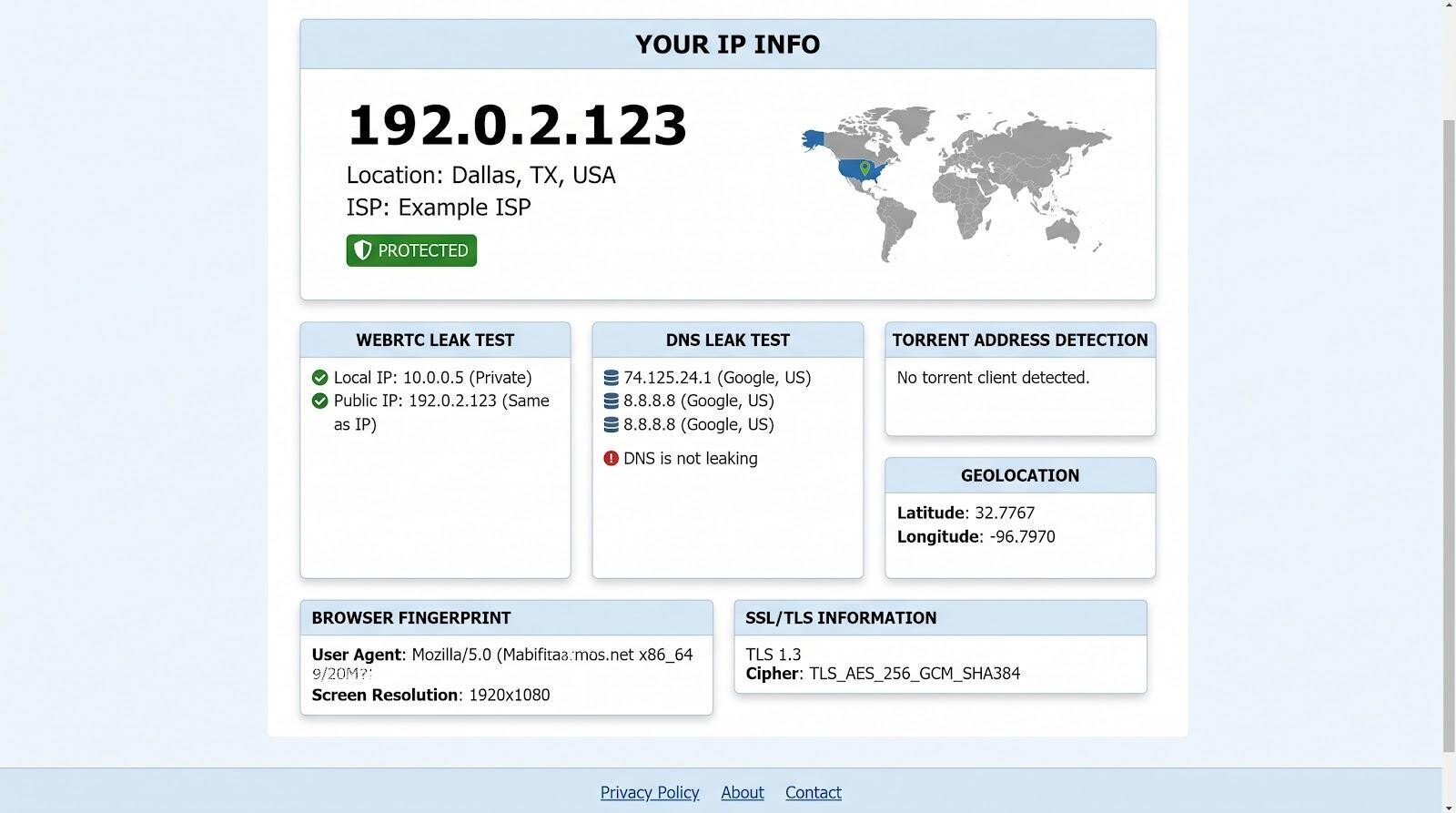
IPLeak.net all in one VPN leak test dashboard screenshot
You land on live tests already running: public IPs plotted on a world map, DNS resolvers that handled the random queries, and—just a short scroll away—a torrent pane with a ready-made magnet link. Paste that into your client and the tracker echoes the IP peers will see.
Why it works:
- Clear verdicts. Each block flashes green or red, then shows raw data so you can trace the cause.
- Deep DNS probing. Queries hit both IPv4-only and IPv6-only name servers, catching hidden v6 routes.
- Extra breadcrumbs. HTTP headers, TLS fingerprints, and geolocation quirks explain browser-to-browser disagreements.
Watch-outs
The interface can overwhelm first-timers, red text is not always a crisis, torrent results are archived for an unspecified period, and the site’s API lacks public docs, so automation requires scraping.
Run IPLeak after major OS, browser, or VPN updates; it is the fastest way to confirm every obvious escape hatch is still sealed.
3. Mullvad Connection Check: best privacy-first experience
Prefer a leak page that collects nothing and shows only what matters? Mullvad Connection Check trims the test to three verdicts: IP, DNS, and WebRTC, each displayed as a simple green or red tag with a one-line hint.
Why privacy fans like it:
- Zero trackers. No third-party scripts, cookies, or ads; results render client side and can be pulled as JSON.
- Clarity over clutter. IPv6 is flagged when present, and private WebRTC addresses are separated from public ones so you do not panic over a 192.168 line.
- Brand transparency. Mullvad publishes warrant canaries and annual audits, and the checker follows the same minimal-data philosophy.
Trade-offs
No torrent pane, crash or transition scenarios, or kill-switch tests, and some text assumes you are on a Mullvad server. Treat it as a quick trust check, then move to IPLeak or a lab suite for deeper coverage.
Open the page on desktop or mobile, note the three badges, snap a screenshot, then close the tab; nothing sticky remains.
4. BrowserLeaks: best for browser-level forensics
BrowserLeaks separates its checks into focused modules—IP, DNS, WebRTC, and fingerprinting—so you can pinpoint which browser is leaking and why.
Key features at a glance
- IP module: shows IPv4 and IPv6 addresses, TLS ciphers, and TCP congestion algorithms.
- DNS module: fires 50 queries (25 through IPv4-only servers and 25 through IPv6-only servers) to expose split-stack quirks.
- WebRTC module: lists every ICE candidate, tags them host or server-reflexive, and surfaces mDNS entries that simply mask local IPs.
Strengths
- Captures more browser-specific data than any other tool in this roundup, making it ideal for bug reports and support tickets.
- Distinguishes harmless private 192.168 addresses from true public leaks, sparing you false alarms.
Limitations
- Raw headers and hex strings can overwhelm newcomers, and some pages carry display ads.
- Lacks a single-page summary; you must open each module in turn.
Workflow tip:
Run the same module in two browsers side by side; differences in Secure DNS handling or fingerprint shields become obvious within seconds.
5. Top10VPN Do I Leak: best torrent leak test
Browser checks stop at HTTP, but torrent clients open multiple channels. Do I Leak adds one crucial step: after a standard IP-, DNS-, and WebRTC scan, it serves a magnet link. The tracker then reports the IPv4 and IPv6 addresses your client broadcasts. A side-by-side “browser vs. torrent” result turns green if they match and red if the swarm sees your real IP.
Extra signals include HTML5 geolocation, mDNS candidates, and any IPv6 path that diverges from your main route, all explained in plain language.
Caveats:
A legacy Flash check still lingers, banner ads load third-party scripts, and the service belongs to a commercial VPN-review site (though we saw no test bias).
Run Do I Leak whenever you tweak port forwarding, switch servers, or seed on public trackers; it is the quickest way to confirm that your P2P traffic is as private as your browser.
6. ExpressVPN Leak Testing Suite: best for advanced and repeatable testing
If a web page is a snapshot, ExpressVPN’s open-source suite is a time-lapse with five core scenarios:
- Traffic integrity: fires HTTP, HTTPS, and QUIC over multiple interfaces while
tcpdump(root required) confirms no stray packets. - Transition stress: drops the tunnel mid-transfer and checks whether the kill switch holds the line.
- Server-failure loop: forces reconnects after simulated endpoint crashes.
- DNS sabotage: injects rogue resolvers to spot leaks that plain browser tests miss.
- BitTorrent seed: shares a file while toggling Wi-Fi to expose client-level leaks.
Clone the GitHub repo, run ./run_tests.py, and the suite outputs JSON you can feed into a CI pipeline. Because the code is public, auditors can trace each assertion, tweak thresholds, or add new cases.
Trade-offs
Setup takes a few minutes and basic command-line comfort; everyday users may prefer ExpressVPN’s simpler online IP, DNS, and WebRTC pages. The repo also lives inside a vendor org, so pair results with neutral tools like BrowserLeaks or dnscheck.tools for cross-validation.
For security teams, reviewers, and fleet admins, the suite is the closest thing to a lab benchmark you can run on a laptop.
7. DNSLeakTest.com: best simple DNS sanity check
How it works
- Standard test: sends 6 unique domains; results arrive in about 30 seconds.
- Extended test: repeats the probe 36 times to catch anycast or load-balanced outliers.
You’ll see a plain list of resolver IPs, hostnames, and countries: no ads, cookies, or WebRTC clutter. Interpreting the data is on you—Cloudflare’s 1.1.1.1 inside your VPN is a pass, and several Google addresses usually share one anycast pool.
Limitations
The tool can’t tell whether queries used DoH, DoT, or plain UDP, and it skips IPv6 as well as disconnect scenarios. Treat it as a first checkpoint; layer on IPLeak or dnscheck.tools if something looks off.
Run DNSLeakTest whenever you change VPN providers, swap resolvers, or suspect split tunnelling. In under a minute you’ll know whether your DNS traffic is at least pointed where you expect.
8. dnscheck.tools: best emerging open-source DNS deep dive
Built under the AGPL, dnscheck.tools goes beyond a simple yes-or-no leak badge. It spins up separate IPv4-only and IPv6-only authoritative servers, then shows, column by column, query type, destination IP, transport, and DNSSEC result. Green ticks mark validation that passed; red crosses flag tampering or split-horizon errors. A sidebar explains each issue in plain language.
Why power users like it
- Browser matrix: four core columns expose resolver reachability and DNSSEC status at a glance.
- Terminal mode: run
dig @resolver TXT leaktest.dnscheck.toolsinside scripts, cron jobs, or CI; the GitHub repo accepts fresh improvements regularly. - Privacy-first design: no cookies, only aggregated metrics, and a sub-200-word policy you can read in under a minute.
Scope limits
No WebRTC, torrent, or transition probes. This tool focuses solely on DNS depth. Toggle the “v6-only” zone to see whether your VPN tunnels DNS over IPv6 while blocking v6 data on other ports.
Keep dnscheck.tools handy for the days when mainstream leak pages disagree or when a DNSSEC failure shows up on only one network. It is the microscope you will reach for when raw resolver truth matters more than a generic green badge.
9. test-ipv6.com: best specialist check for native IPv6
Many VPNs still tunnel only IPv4. A 2025 pre-print that tracked 129 000 daily users found native IPv6 leaking for up to 57 percent of people on some v4-only providers, so a v6-specific test matters. test-ipv6.com runs three reachability probes:
- IPv4-only
- Dual-stack
- IPv6-only
It then assigns a 0–10 score: 10 means your browser can reach IPv6-only hosts and DNS prefers v6 records, 0 means complete failure. If your score drops when the VPN connects, the tunnel is blocking or mishandling IPv6.
Why it’s useful
- Open source. The Falling Sky code lives on GitHub, and a Regional Internet Registry (RIR) revived the service after a planned 2025 shutdown.
- Fast. Results arrive in under 30 seconds with no ads or trackers.
- Mirror-friendly. Researchers can host private instances to verify scoring logic.
Limits
The page does not label an exposed v6 address as a definite leak; you must compare against your VPN-off baseline and the provider’s policy. It also skips WebRTC and DNS-resolver identity, so pair it with IPLeak or BrowserLeaks for a full picture.
Run test-ipv6.com after OS updates, router firmware flashes, or any VPN change. A sudden score drop is your cue to revisit tunnel settings before real traffic leaves the v6 side door.
How to interpret your VPN leak-test results
Use this five-point checklist to decide whether a “red flag” is real or noise:
- Public IPv4
- Matches baseline → tunnel never engaged or dropped.
- New address in your VPN’s ASN → expected.
- IPv6
- “No IPv6 detected” can be normal if the provider blocks v6.
- Public v6 from your ISP while IPv4 is tunneled → likely leak; some apps may bypass the VPN.
- DNS resolvers
- ISP-owned IPs → leak.
- VPN-branded or intentional third-party resolvers (Cloudflare 1.1.1.1, Google 8.8.8.8) → OK if configured on purpose.
- Several IPs in one ASN often belong to the same anycast cluster, usually not a leak.
- WebRTC candidates
- Public IP that matches your baseline → leak.
- Private 192.168/10.x → local metadata only.
- mDNS names ending in
.local → browser masking feature, not exposure. - VPN exit IP → healthy.
- Torrent swarm IP
- Should match the browser’s VPN exit IP.
- If the tracker shows your home address, re-bind the client to the VPN interface or enable its internal kill switch.
See a pattern of leaks?
- Recheck browser Secure DNS, disable split tunnelling, or enable the VPN’s kill switch.
- Retest after each change. Persistent issues warrant provider support, backed by screenshots and timestamps.
Treat the checklist like vital signs: one anomaly may be a configuration quirk; consistent failures mean the tunnel needs fixing before sensitive traffic leaves your device.
The 2026 complications: encrypted DNS and smarter WebRTC
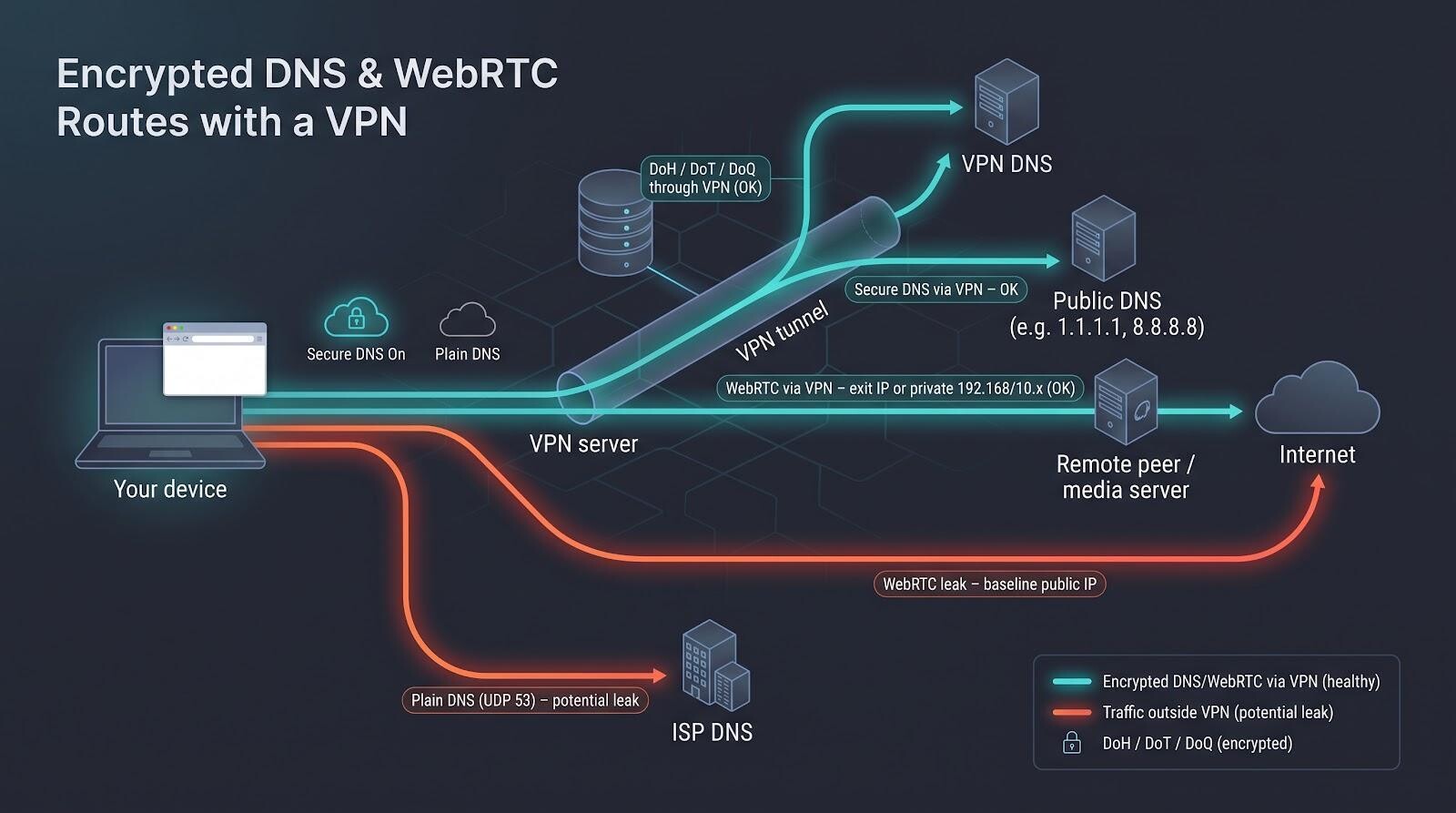
Secure DNS in three tiers
- Chrome Automatic. Upgrades to DoH when it recognizes a public resolver and falls back to plaintext if the provider is unknown.
- Firefox Standard. Disables DoH when a VPN is detected; the Increased and Max levels force every query to Cloudflare over HTTPS unless the VPN advertises compatibility.
- DoQ arrival. Finalized in May 2022 (RFC 9250), DNS-over-QUIC rides UDP 853 and slips past port-53 firewalls, so leak tools that check only ports can miss it.
Ask yourself:
- Who received the query?
- Did it travel through the VPN interface?
- Was it encrypted (DoH, DoT, or DoQ)?
dnscheck.tools answers question 1. Choosing v4-only or v6-only zones helps with question 2, and a packet capture confirms question 3.
WebRTC after RFC 8828
- Chrome and Brave now default to the primary interface, matching VPN routes automatically.
- Firefox exposes a toggle (
media.peerconnection.ice.default_address_only) for the same behavior.
Healthy: WebRTC shows the VPN exit IP or a private 192.168/10.x address.
Leak: a public IP that matches your pre-VPN baseline or a Wi-Fi IP while the VPN tunnels over Ethernet.
Bottom line: When a tester reports a “DNS leak” or “WebRTC leak,” verify route and encryption first. Context turns false alarms into fixes that matter.
Testing WireGuard and kill-switch leaks in 5 quick steps
- Audit your config.
- In
[Interface], setDNS= to the VPN’s internal resolver or a trusted DoH stub; never leave it blank. - In
[Peer], confirmAllowedIPs = 0.0.0.0/0, ::/0 for a full tunnel. Missing::/0 lets IPv6 escape.
- In
- Enable a firewall kill switch.
- Linux:
wg-quick up wg0 auto-addsiptables rules; verify withsudo iptables -L | grep wg-quick. - Windows or macOS: turn on the client’s kill-switch toggle or add OS-level rules.
- Linux:
- Simulate a drop.
- Start
ping 1.1.1.1. - Unplug Ethernet or toggle Wi-Fi off and on.
- Pings halt until WireGuard reconnects; no packets should leave the physical NIC in a packet capture.
- Start
- Crash-test the client.
- Kill the VPN process.
- A true kill switch keeps traffic blocked; restart the client and verify reconnection.
- Rerun your browser leak checks.
- All badges stay green, and tcpdump logs show no stray DNS or ICMP during the outage.
- If leaks appear, revisit DNS, routes, or firewall rules and repeat.
Mobile VPN leak testing: what desktop guides miss
Use this five-step checklist to catch leaks your phone may hide when it hops between networks:
- Wi-Fi → cellular hand-off
- Start an all-in-one checker on Wi-Fi, note IP, DNS, and WebRTC, then switch to 5G or LTE.
- A good tool flashes red if packets escape during the hop. If nothing changes, reload to clear stale sockets.
- OS-level DNS overrides
- Toggle Android Private DNS or iOS Limit IP Address Tracking.
- If dnscheck.tools suddenly lists Google or Cloudflare, the operating system, not the VPN, changed the resolver.
- Packet capture reality check
- Android permits only one VPN owner, so PCAPdroid needs root to run beside another VPN.
- Without root, mirror traffic at your router or enable server-side logs on endpoints you control.
- Split-tunnelling audit
- Many mobile clients let you exclude apps to save battery.
- Make sure high-risk apps (banking, messaging, torrent) are set to use the VPN before trusting a clean browser result.
- Sleep and push-notification test
- Schedule a push notification, lock the phone, wait, then unlock.
- Some VPNs drop their tunnel during sleep; watch a leak tool for traffic in that dark window.
Mobile testing can feel tedious, but these five checks close the biggest blind spot: the hours your phone spends off-charger, hopping networks while you are not watching.
Troubleshooting: your leak test flashes red? Follow these 6 steps
- Check the address against your baseline.
- Same as pre-VPN → tunnel never engaged or dropped. Reconnect and retest in a fresh tab; if still red, switch servers or reinstall.
- DNS red flag.
- ISP resolver = true leak.
- Google or Cloudflare may be Secure DNS. Disable Secure DNS, retest, or add the VPN’s internal resolver in the app or OS.
- WebRTC alert.
- Public baseline IP = leak.
- Private 192.168/10.x or
.local mDNS = local metadata. - Fix: enable the browser’s “route WebRTC via default network” flag or install its WebRTC limiter extension, then retest.
- IPv6 mismatch.
- Open WireGuard or OpenVPN config; add
::/0 toAllowedIPs for full-tunnel IPv6. - If the provider blocks v6, disable IPv6 at the OS level until support improves.
- Open WireGuard or OpenVPN config; add
- Torrent exposure.
- Bind the client to the VPN interface, enable its kill switch, or use the provider’s proxy credentials.
- Rerun a magnet test; the tracker IP should match the VPN exit.
- Transition-only leaks.
- Appear during Wi-Fi ⇔ mobile or sleep–wake cycles.
- Enable the VPN’s kill switch or connection monitor so traffic waits for the tunnel.
Work through the list and most leaks shrink to a quick settings tweak; no panic required.
Conclusion
Work through the list and most leaks shrink to a quick settings tweak; no panic required.