

Selecting one useful AI response is clearer than replaying an entire conversation. Original editorial image created for this article.
If the answer you need is halfway down a long ChatGPT thread, you do not have to replay every prompt and reply. With CastReader’s browser extension, you can start playback on one supported ChatGPT response, follow the text as it is highlighted, and pause when a link, number, or claim needs checking. This works best for finished explanations and summaries; tables, code,e and high-stakes advice still need visual review.
Voice conversation and read aloud solve different problems. Voice mode is for a live exchange; per-response playback is for reviewing the exact wording of a written answer that already exists.
How to listen to one ChatGPT response with CastReader
- Install and enable CastReader from the Chrome Web Store.
- Open the ChatGPT conversation and scroll to the finished answer you want to hear.
- Wait until the response has finished generating.
- Use the CastReader control attached to that response to start playback instead of beginning at the top of the thread.
- Keep the page visible while synchronized highlighting follows the narration. Pause for code, tables, links, names, or numbers that need visual checking.
- If the control does not appear, reload the page, update the extension, and check the current compatibility guidance.
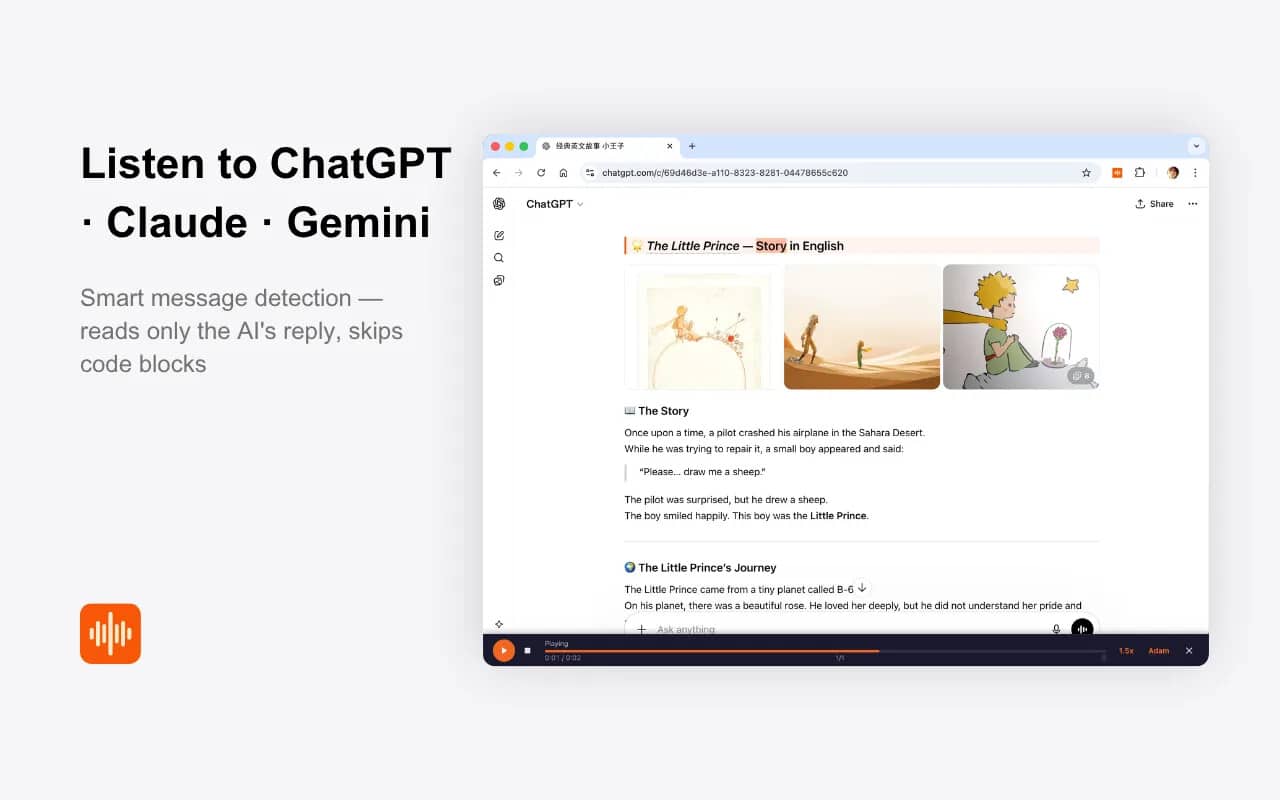
Product screenshot — CastReader reading an individual ChatGPT response with active playback, progress, speed, and voice controls. Source: CastReader official Chrome Web Store listing, captured August 26, 2026. © CastReader. ChatGPT is a trademark of OpenAI; CastReader is not affiliated with OpenAI.
Choose the one ChatGPT response worth hearing
Do not turn every message into audio. Start by identifying the answer that contains the useful outcome: the final explanation, revised plan, comparison, or step-by-step guide. If the answer includes a large table or code block, consider listening only to the narrative portions and reviewing the structured material visually.
An individual-response workflow preserves context without forcing the listener through obsolete prompts. It is helpful for long explanations, language practice, study notes, and professional research. It also reduces the risk of confusing an early draft with the final answer.
Keep the text and audio together
AI answers often contain unfamiliar names, product terms, abbreviations, or numbers. Audio alone can make these hard to verify. Synchronized highlighting lets the listener glance at the current sentence without searching through the page.
People who want to listen to ChatGPT with CastReader can use the browser extension’s supported per-response control. Rather than beginning at the top of the conversation, the user starts at the answer that matters and follows the visible text as it is spoken.
This is particularly useful when the response contains several sections. A listener can pause after one section, consider it, and then continue. The written answer remains available for copying, checking, or annotating.
Prepare a clean listening version
Before pressing play, ask whether the answer is ready to review. Remove or regenerate obvious mistakes. Ask ChatGPT to clarify unexplained acronyms or reorganise a rambling response into headings. A well-structured answer is easier to understand both on screen and aloud.
For code-heavy answers, request a plain-language explanation separate from the code. For numerical analysis, keep the figures visible and verify them independently. Text-to-speech will pronounce the content, but it cannot determine whether the underlying calculation or source is correct.
Playback speed should match the material. A familiar summary may work at a faster rate, while a technical answer needs a slower pace. Repeated rewinding is a sign to reduce speed or return to visual reading.
Use listening as a review pass
Hearing an answer can reveal weaknesses that skimming misses. Repetition becomes obvious. Abrupt logical jumps stand out. A confident tone may expose a claim that lacks evidence. These signals are useful because AI writing can sound polished even when its reasoning is incomplete.
Pause whenever something seems uncertain and check a primary source. For medical, legal, financial, or safety decisions, an AI answer should never be treated as professional advice simply because it sounds fluent.
Limits: page changes, code, tables, and high-stakes advice
Browser integrations depend on supported page layouts, and AI services can change their interfaces. If a listen button disappears, reload the page, update the extension, and check current compatibility guidance. Do not assume a tool will work identically on every device or every future version of the site.
Used thoughtfully, per-response listening turns a long chat into a manageable queue of useful answers. It does not make the content more authoritative. It simply gives users another way to review the exact response they chose, while keeping the text close enough to question, verify, and understand it.
Privacy and team use
If an answer will influence a team decision, share the written response and its sources rather than audio alone. Do not use confidential company or personal data unless your organisation permits both the AI service and the reading extension. Test the workflow first with public or fictional content.
If you often return to one useful answer in a long thread, install CastReader from the Chrome Web Store and test it on a non-sensitive ChatGPT conversation. Start with one finished response, keep the original text open, and use the audio as a review aid—not as proof that the answer is correct.