


Uploading one file feels effortless. But everything changes when the user selects 20, 50, or 100 files at once.
What should be a simple action quickly turns messy. Uploads slow down, some files fail while others succeed. Progress bars become unreliable, and users are forced to retry again and again. It’s frustrating and it’s exactly where many systems break.
The root issue is simple: most upload systems are built for single-file workflows. They aren’t designed to handle high-volume, real-world usage where users upload multiple files simultaneously.
In this guide, we’ll walk through the real challenges behind multi-file uploads. We will also explore how modern SaaS platforms solve them to deliver fast, reliable, and scalable experiences.
Key Takeaways
- Multi-file uploads introduce concurrency, performance, and UX challenges
- Sequential uploads don’t scale for real-world usage
- Controlled parallel uploads and queuing are essential
- Each file must be handled independently
- Managed solutions like Filestack simplify implementation
Why Multi-File Uploads Are Harder Than They Look
At first glance, uploading multiple files feels like a simple extension of uploading just one. But once you scale it up, things get complicated fast. Behind the scenes, your system has to juggle multiple requests, handle failures, and still keep everything smooth for the user.
The Hidden Complexity
Uploading multiple files isn’t just “repeat the same process multiple times.” It requires managing multiple moving parts at once.
You’re dealing with concurrent requests, tracking each file’s state, handling partial failures, and still keeping the user experience smooth. That’s a lot to coordinate in real time.
The Scale Factor
Things might work perfectly when uploading 3–5 files. But as soon as the number increases, everything scales with it.
Network usage spikes, memory consumption grows, and the chances of failure increase. A system that feels stable at small scales can quickly collapse under heavier loads.
Common Failure Patterns in Multi-File Upload Systems
When multi-file uploads start failing, it’s rarely due to one big issue. It’s usually a combination of small design decisions that don’t hold up at scale. Let’s break down the most common patterns that quietly cause problems in real-world systems.
1. Sequential Upload Bottlenecks
Uploading files one after another might feel like the safest option at first. But in practice, it slows everything down significantly.
The total upload time increases with every additional file, and users are forced to wait longer than necessary. It also means a single network hiccup can interrupt the entire process after minutes of waiting.
2. Uncontrolled Parallel Uploads
Trying to upload all files at once can backfire just as badly. While it sounds faster, it often pushes the system beyond its limits.
Browsers, networks, and servers can easily get overwhelmed, leading to throttling or failed requests. Instead of speeding things up, this approach often creates instability.
3. No Per-File Error Handling
Treating multiple uploads as a single batch creates a fragile system. One failed file can bring the entire process to a halt.
This forces users to restart everything, even if most files were already uploaded successfully. It’s frustrating and wastes both time and bandwidth.
4. Poor State Management
Without proper tracking, users are left guessing what’s happening. There’s no clear visibility into which files are uploading, completed, or failed.
This lack of clarity makes retries confusing and reduces user trust in the system. People shouldn’t have to guess whether their files made it or not.
5. Inconsistent Progress Feedback
A single progress bar might look clean, but it rarely tells the full story. Different files upload at different speeds, which makes the overall progress hard to represent accurately.
Users often see progress jump, stall, or behave unpredictably. This creates uncertainty and makes the experience feel unreliable.
6. Backend Overload
Routing every file through your backend adds unnecessary strain to your system. As the number of uploads grows, so does the pressure on your servers.
CPU and memory usage spike, response times slow down, and failures become more frequent. What worked at a small scale quickly becomes a bottleneck.
7. Lack of Retry Strategy
In real-world conditions, temporary failures are unavoidable. Networks drop, requests time out, and connections fluctuate.
Without a retry mechanism, even minor issues turn into permanent failures. Users are then forced to manually restart uploads, which quickly becomes frustrating.
Lessons From Real-World SaaS Platforms
After seeing these issues play out in production, most SaaS teams don’t just fix bugs. They rethink how uploads are handled entirely. Over time, clear patterns and best practices start to emerge from real-world usage. These lessons are what separate fragile upload systems from ones that feel fast, reliable, and effortless to users.
Lesson 1: Parallelism Must Be Controlled
Uploading multiple files in parallel is powerful, but only when controlled.
Limit concurrent uploads (usually 3–5 at a time) and queue the rest. This prevents resource overload while maintaining good performance.
Lesson 2: Treat Each File as an Independent Unit
Each file should be handled separately, with its own state, progress, and retry logic.
This way, if one file fails, it doesn’t affect the others. Users can retry only what’s needed instead of starting over.
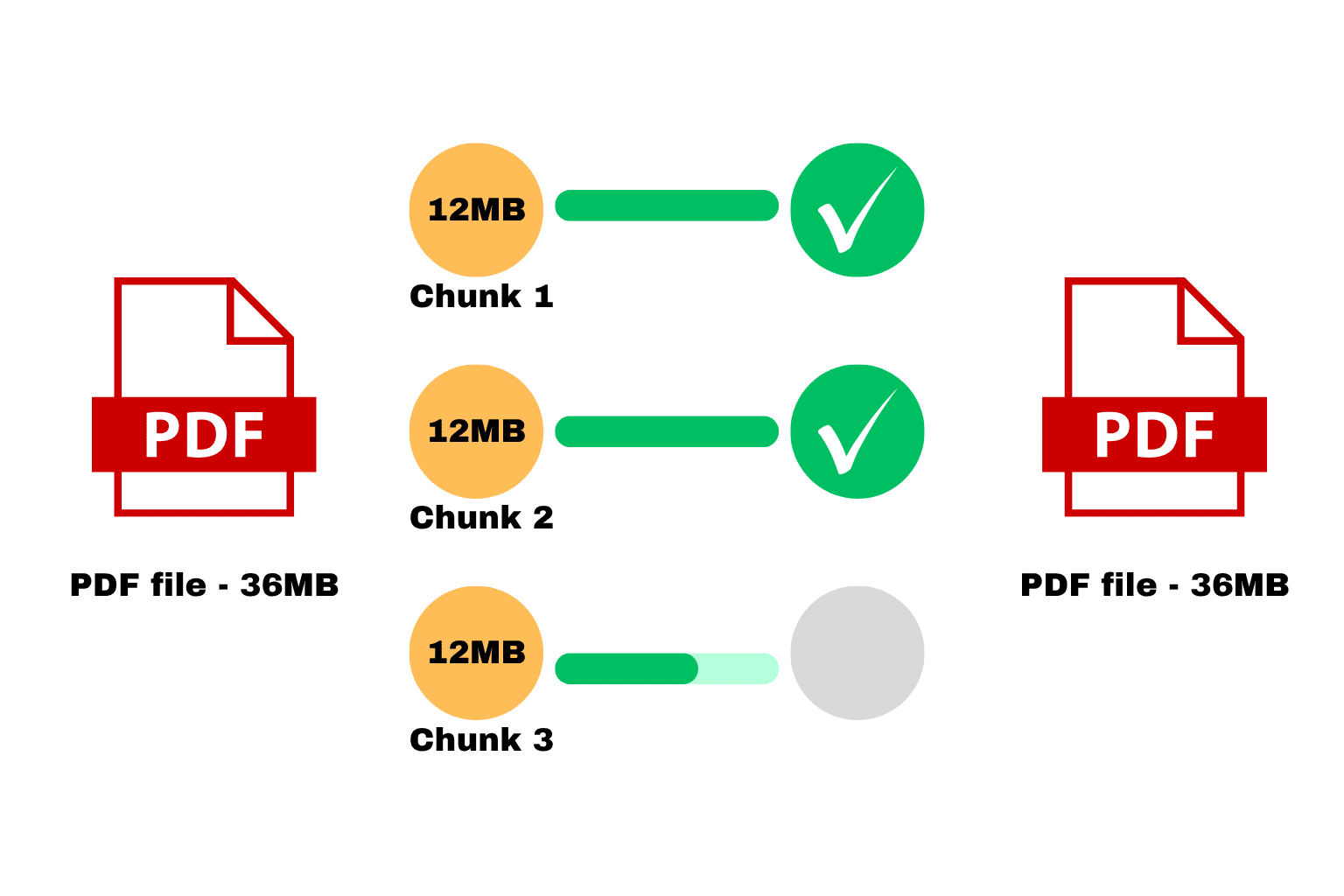
Lesson 3: Use Chunked Uploads for Large Files
Large files are more likely to fail. Breaking them into smaller chunks makes uploads more resilient.
If something goes wrong, only the failed chunk needs to be retried, not the entire file.
Lesson 4: Prioritize User Experience
A smooth experience matters just as much as technical performance.
Show per-file progress, clearly indicate success or failure, and make retries simple. When users understand what’s happening, they’re far more likely to complete uploads.
Lesson 5: Move Uploads Away From Backend Servers
Modern systems avoid routing files through backend servers altogether.
Instead, files are uploaded directly to cloud storage. This reduces server load, improves scalability, and significantly speeds up uploads.

Lesson 6: Implement Smart Retry Mechanisms
Failures will happen. It’s unavoidable.
What matters is how your system responds. Automatically retry failed uploads, and only retry the parts that failed. This dramatically improves success rates.
Lesson 7: Monitor and Optimize Continuously
Upload systems aren’t “set and forget.”
Track metrics like success rates, failure reasons, and upload times. These insights help you identify bottlenecks and continuously improve performance.
Architecture for Scalable Multi-File Uploads
To build a system that can handle multiple uploads smoothly, you need a structured approach. Each step plays a role in improving performance, reducing failures, and creating a better experience for users.
Step 1: File Selection and Queue Creation
When a user selects multiple files, the system doesn’t upload them immediately. Instead, it organizes them into a queue to control how they will be processed.
Step 2: Controlled Parallel Upload Execution
The system uploads only a limited number of files at the same time. The rest stay in the queue, waiting their turn to avoid overloading the network or browser.
Step 3: Per-File Upload Handling
Each file is handled as an independent task with its own progress tracking and error handling. If something fails, users can retry that specific file without restarting everything.
Step 4: Chunked Upload for Large Files
Large files are broken into smaller chunks before uploading. These chunks are uploaded separately and then reassembled once all parts are complete.
Step 5: Direct-to-Cloud Storage
Instead of sending files through your backend, uploads go directly to cloud storage. This reduces server load and improves overall upload speed and scalability.
Step 6: Post-Upload Processing
Once the upload is complete, the system validates the file and extracts important metadata. It can also perform transformations so the file is ready for use in the application.
Why Building This Internally Is Challenging
On paper, this architecture sounds straightforward. In reality, it’s anything but.
You’re dealing with concurrency control, state management, retry logic, distributed systems, and performance optimization all at once.
This leads to high development effort, ongoing maintenance, and complex debugging, especially at scale.
How Managed Upload APIs Simplify Multi-File Uploads
Instead of building everything from scratch, many teams use managed solutions like Filestack.
These platforms handle the heavy lifting for you:
- Controlled Parallel Uploads → Automatically manages concurrency
- Built-in Chunking → Handles large files reliably
- Per-File State Management → Tracks each file independently
- Direct-to-Cloud Infrastructure → Removes backend bottlenecks
- Retry and Error Handling → Improves success rates
This allows teams to focus on product features instead of infrastructure challenges.
Example Implementation
Let’s walk through how managed upload APIs work using this Filestack example.
With Filestack, you don’t need to build a full upload system from scratch. A few lines of code are enough to handle multi-file uploads with progress tracking, retries, and direct-to-cloud storage.
1. Install and Initialize the SDK
Start by installing and initializing the Filestack JavaScript SDK in your frontend:
import * as filestack from 'filestack-js';

const client = filestack.init('YOUR_API_KEY');
2. Open File Picker for Multiple Uploads
Use Filestack’s built-in picker to allow users to select multiple files:
const options = {
  maxFiles: 20, // limit number of files
  uploadInBackground: false,
};

client.picker(options).open();
3. Enable Direct-to-Cloud Upload + Progress Handling
Filestack automatically uploads files directly to cloud storage and provides progress updates.
4. Handle Upload Results
Once uploads are complete, you can access the uploaded file data easily:
const options = {
  maxFiles: 20,
  onUploadDone: (result) => {
    console.log('Uploaded files:', result.filesUploaded);

    result.filesUploaded.forEach(file => {
      console.log('File URL:', file.url);
    });
  }
};

client.picker(options).open();
With this setup, you get multi-file uploads, progress tracking, direct-to-cloud storage, and basic error handling out of the box without building complex infrastructure yourself.
Conclusion
Multi-file uploads are far more complex than they appear at first glance.
Without the right architecture, they quickly lead to slow performance, higher failure rates, and a frustrating user experience.
To build a scalable system, you need controlled parallelism, per-file handling, chunked uploads, and direct-to-cloud architecture working together.
For most teams, building this from scratch is expensive and time-consuming. That’s why many turn to managed solutions to deliver reliable, scalable uploads without reinventing the wheel.