

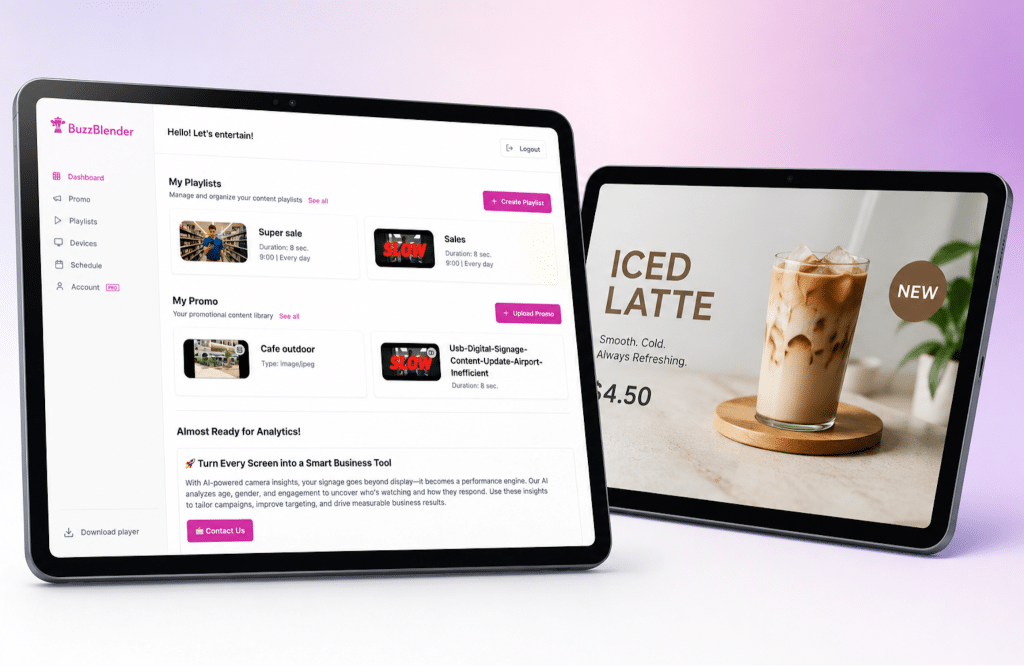
Most digital signage software was built for TVs first and tablets second.
That becomes obvious the moment you try to deploy screens across cafés, retail counters, pop-up stores, events, or sales teams using iPads and Android tablets instead of mounted displays. Suddenly, the “enterprise signage platform” you picked feels bloated, hard to manage, or weirdly optimized for 55-inch screens. Here’s what actually matters.
What Makes a Digital Signage App Good on Tablets?
A lot of platforms technically “support tablets.”
That doesn’t mean they’re good on tablets.
The difference usually comes down to interface assumptions. Software designed around large-format displays often breaks down on smaller touchscreens:
- layouts feel cramped
- remote management becomes awkward
- apps drain battery
- orientation changes create bugs
- kiosk mode feels unstable
The strongest tablet-first signage platforms simplify the stack instead of expanding it.
They usually prioritize:
1. Fast onboarding
If setup requires MDM systems, complicated provisioning, or enterprise IT involvement, it’s probably overkill for tablet deployments.
Good tablet signage software should let someone turn an iPad into a working display in minutes.
2. Reliable kiosk mode
This is non-negotiable.
Whether you’re running restaurant menus, exhibition screens, or retail promos, the app needs to stay locked, stable, and remotely recoverable.
3. Mobile-native content management
Desktop-heavy CMS experiences slow teams down.
Modern signage tools increasingly focus on lightweight editing, drag-and-drop scheduling, and cloud sync because distributed teams need to publish updates quickly.
4. Performance on lower-cost hardware
One overlooked factor: many businesses deploy older Android tablets instead of premium devices.
Apps optimized only for flagship hardware create scaling problems later.
The Problem With “Enterprise” Digital Signage Platforms
A surprising number of businesses don’t actually need enterprise signage software.
They need simple content delivery.
But many platforms still position themselves around:
- massive display networks
- corporate compliance workflows
- hardware partnerships
- custom infrastructure
That works for airports and large retailers.
It doesn’t always work for:
- cafés
- salons
- clinics
- local stores
- trade shows
- sales teams
- temporary installations
This is where newer, more flexible tools are gaining traction.
Instead of forcing businesses into TV-centric workflows, they treat tablets as primary deployment devices.
And that changes product design completely.
Where BuzzBlender Fits In
BuzzBlender – Cheap Signage Software (just $5 per screen per month) approaches digital signage differently from traditional platforms.
Instead of positioning itself as heavy enterprise infrastructure, it focuses on lightweight content distribution optimized for modern devices — including tablets.
That matters because tablet signage deployments tend to have very different operational realities:
- smaller teams
- faster content cycles
- less technical oversight
- more decentralized updates
BuzzBlender works especially well for businesses that want:
- simple remote content update on Android
- social-style visual content
- lightweight setup
- flexible tablet deployments
- easier content scheduling without enterprise complexity
In practice, that makes it appealing for:
- hospitality
- retail counters
- beauty & wellness spaces
- event activations
- small franchise networks
The bigger trend here is important.
Digital signage is moving away from “broadcast infrastructure” and toward agile content systems that behave more like modern publishing tools.
BuzzBlender sits closer to that newer category.
iPad vs Android Tablets for Digital Signage
The hardware choice matters more than most buyers expect.
iPads are usually better for:
- stability
- long-term OS support
- kiosk reliability
- premium retail environments
Android tablets are usually better for:
- cost efficiency
- large-scale deployments
- flexible hardware options
- custom mounting setups
The best signage apps support both without treating one as an afterthought.
That sounds obvious, but many platforms still prioritize Android players or external hardware dongles instead of native tablet experiences.
So, Which Digital Signage App Works Best on Tablets?
There isn’t one universal answer.
But there is a clear pattern.
If you’re running large enterprise display infrastructure, traditional signage platforms still make sense.
If you’re deploying flexible, tablet-based signage across modern customer-facing environments, lighter platforms tend to perform better operationally.
That’s why tools like BuzzBlender are increasingly relevant.
They match how businesses actually deploy screens today:
- faster
- leaner
- more distributed
- more content-driven