

Close Menu
Soup.io
  • Home
  • News
  • Technology
  • Business
  • Entertainment
  • Science / Health
Facebook X (Twitter) Instagram
  • Contact Us
  • Write For Us
  • Guest Post
  • About Us
  • Terms of Service
  • Privacy Policy
Facebook X (Twitter) Instagram
Soup.io
Subscribe
  • Home
  • News
  • Technology
  • Business
  • Entertainment
  • Science / Health
Soup.io
Soup.io > News > How to add Sound Alerts to your Kick stream
News

How to add Sound Alerts to your Kick stream

Cristina MaciasBy Cristina MaciasMay 12, 2023Updated:May 12, 2023No Comments2 Mins Read
Facebook Twitter Pinterest LinkedIn Tumblr Email
How to add Sound Alerts to your Kick stream
Share
Facebook Twitter LinkedIn Pinterest Email

Since joining Kick you may have asked yourself “Can i add Sound Alerts to my Kick stream?” well now you can! Blerp just launched their exclusive Beta for Kick! You can now add Sound Alerts to your Kick stream. Viewers will be able to share over 1M+ DMCA safe sounds on your stream. Streamers set the price to play sounds using either Blerp currency they purchase or Channel points. Blerp is one of the best ways to make more money on Kick!

Its now easier than ever to add soundboards and sound alerts to your stream. All you need to do is go to blerp.com/x and get your beta code. Once you’ve signed up you can set up your Sound alerts by claiming your URL, adding the browser source to your streaming software and selecting and featuring content from over 1 Million DMCA safe sounds.

You will then need to add the extension download link for your viewers to go download the Blerp Browser extension and add your unique URL to your panel!
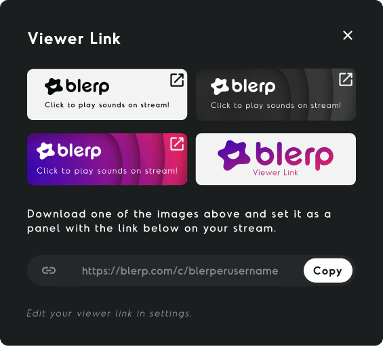
Blerp is one of the best ways to add more engagement to your stream and make more money while streaming. You set the price and the cooldown between plays and you get 100% of the revenue from each share!

You can also create your own soundboards for your stream by making soundbites from your Twitch clips, and youtube content. The options are endless to creating hilarious moments on your stream. If you’d like to learn more about Blerp you can check out their Tiktok here.

If you’re looking for a way to grow your stream on Kick try using Blerp Sound alerts!

Share. Facebook Twitter Pinterest LinkedIn Tumblr Email
Previous Article11 Reasons to Have an Effective Google Adwords Campaign
Next Article Options for Accent Walls
Cristina Macias
Cristina Macias

Cristina Macias is a 25-year-old writer who enjoys reading, writing, Rubix cube, and listening to the radio. She is inspiring and smart, but can also be a bit lazy.

Related Posts

The Best Way to Scale Short-Form Video With a Small Team

August 15, 2026

From Mutual Funds to PMS: How Top Financial Advisors in India Build Diversified Portfolios

August 15, 2026

We Saw It Coming: What Byju’s and Go First Taught Us About the Future of Credit Monitoring

August 15, 2026

Subscribe to Updates

Get the latest creative news from Soup.io

Latest Posts
The Best Way to Scale Short-Form Video With a Small Team
August 15, 2026
From Mutual Funds to PMS: How Top Financial Advisors in India Build Diversified Portfolios
August 15, 2026
We Saw It Coming: What Byju’s and Go First Taught Us About the Future of Credit Monitoring
August 15, 2026
YNAB (You Need A Budget) for Zero-Based Money Management
August 15, 2026
How to open an FCNR account with the best interest rates
August 14, 2026
Revolutionary War Strategy Games Are Attracting a Surprisingly Younger Audience Lately
August 14, 2026
Is Your Organization Actually Prepared for a Compliance-Focused Security Audit?
August 14, 2026
5 Mistakes That Can Seriously Weaken a Car Accident Claim
August 14, 2026
4 Household Ingredients That Restore Tarnished Sterling Silver Chains
August 14, 2026
6 Classroom Stamps Teachers Reach for Most Often
August 14, 2026
7 Ways a Center Line Tool Improves Overall Notching Precision
August 14, 2026
How Do Courts Actually Calculate Child Support Payments Between Parents
August 14, 2026
Follow Us
Follow Us
Soup.io © 2026
  • Contact Us
  • Write For Us
  • Guest Post
  • About Us
  • Terms of Service
  • Privacy Policy

Type above and press Enter to search. Press Esc to cancel.