

Introduction
One in three Android apps and more than half of iOS apps leak sensitive data. Beyond exposing weaknesses in application security, these findings raise an important question about how effectively mobile apps protect sensitive operations when risk conditions change during an authenticated session.
Consider a banking customer who signs in from a trusted device but later initiates a high-value transaction under suspicious conditions. Although the existing session remains authenticated, changes in device integrity or user behavior may warrant additional verification. This is where adaptive authentication apps become relevant. Instead of relying solely on initial authentication, apps can evaluate contextual risk signals and initiate policy-driven responses. Depending on the assessed risk, they may allow access, request additional authentication, or restrict the operation.
Implementing these risk-based decisions in mobile apps without adding unnecessary authentication friction requires careful coordination between mobile apps and backend security systems. This article examines how adaptive security works, its implementation requirements, and the engineering considerations involved.
How Does Adaptive Authentication Mobile Apps Work?
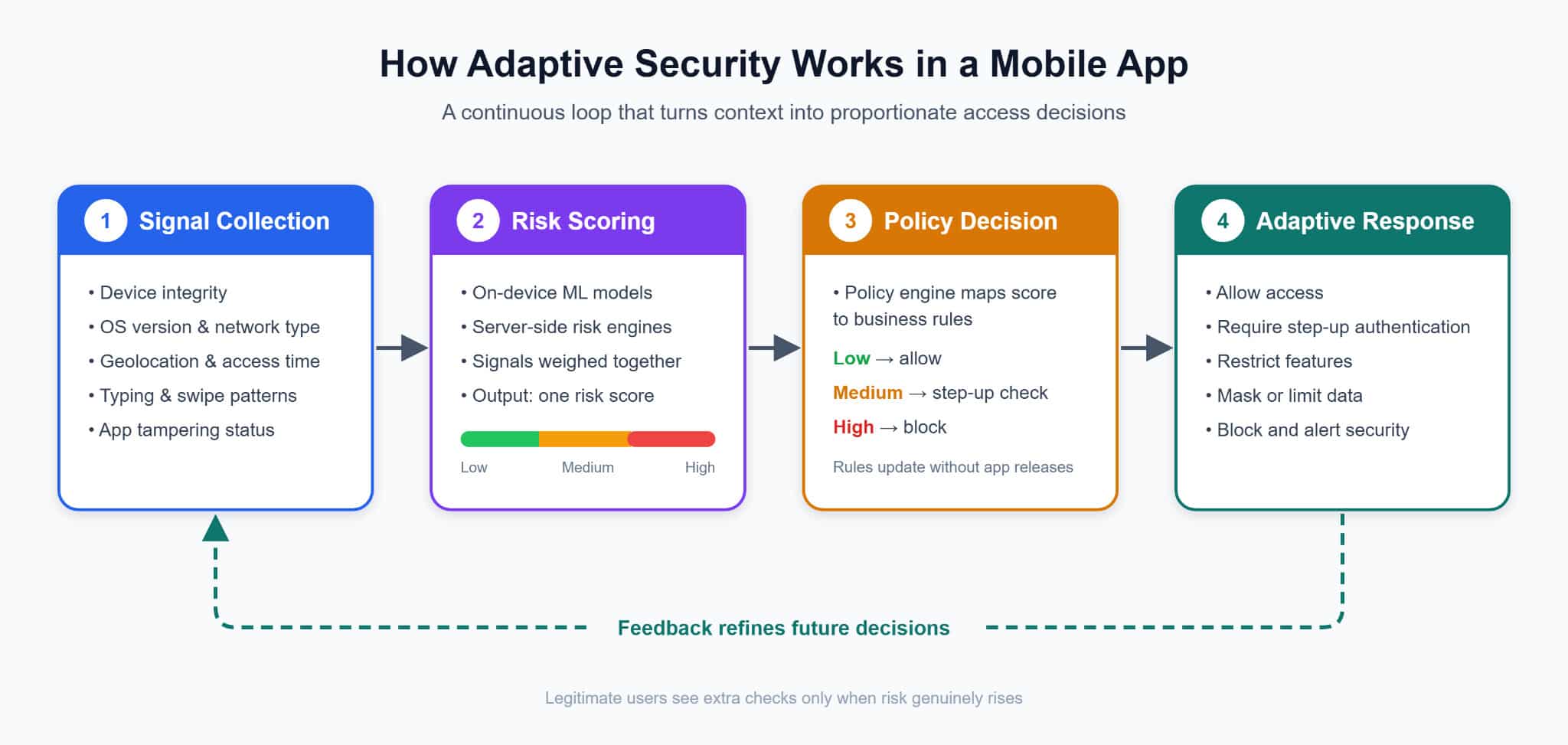
Adaptive security works as a continuous loop rather than a single login check. Each stage feeds the next, turning raw device and user context into a clear, proportionate access decision.
Signal Collection
Adaptive security begins by gathering contextual information about the user and their current session. This includes device integrity, OS version, network type, geolocation, and access time. Behavioral signals, such as typing rhythm and swipe patterns, provide further context, while tampering indicators help identify potentially compromised application environments.
Risk Scoring
The collected signals are then analyzed together using on-device ML models or server-side risk engines to determine the session’s risk level. For instance, accessing an app from a new location may not be suspicious. However, when combined with a rooted device and unusual typing patterns, the same activity may indicate a higher security risk.
Policy Decision
The assessed risk level determines which access policies should apply to the requested action. A policy engine compares the risk score against predefined rules, allowing low-risk requests to proceed while requiring additional verification for moderate-to-high-risk activity. Requests exceeding acceptable risk thresholds may be denied, and backend policies may be adjusted as security requirements evolve.
Adaptive Response
Once the applicable policy is determined, the application adjusts the user’s access accordingly. It may permit the requested action, initiate step-up authentication, restrict certain features, or prevent access to sensitive information. The outcome also informs subsequent risk assessments, allowing security requirements to adapt as session conditions change.
How to Build Adaptive Authentication Mobile App that Lets Apps Set their Own Access Policies?
Implementing adaptive security requires more than integrating authentication SDKs. Therefore, organizations should hire mobile app developers to establish trustworthy device signals, protect sensitive operations, and coordinate risk-based access decisions across mobile applications and backend infrastructure.
1. Verify App and Device Integrity through Platform Attestation
Before relying on device-generated signals, mobile app development experts need mechanisms to assess whether an app is operating in a trustworthy environment. Platform attestation provides cryptographically verifiable evidence to support this assessment.
On Android, the Play Integrity API provides verdicts about application authenticity, device integrity, and Google Play licensing status. On iOS, App Attest uses cryptographic keys to help servers verify that requests originate from legitimate application instances.
Additionally, the backend must verify these responses before incorporating them into access decisions. Since attestation cannot guarantee complete device security, evaluate its findings alongside other risk indicators.
2. Harden the Runtime With RASP and Anti-Tampering
Runtime application self-protection (RASP) detects threats while the app runs, including debuggers, hooking tools like Frida, emulators, and rooted or jailbroken devices. It also checks the app’s own signature and code integrity, which catches repackaged builds. Mobile app developers can also combine RASP with code obfuscation to make these security checks harder for attackers to find and disable.
However, determined attackers can still bypass any client-side check, so the app should never act on its own detections alone. Instead, it must report them to the backend as signed signals that raise the session’s risk score. Then the policy engine can choose a proportionate response, rather than the app simply crashing.
3. Protect Keys and Tokens with Hardware-Backed Storage
On iOS, store session tokens in the Keychain with a “ThisDeviceOnly” accessibility class, so they don’t move to another device through backups. The Secure Enclave supports only P-256 elliptic-curve private keys, which it generates internally and never exports. On Android, generate keys inside the Android Keystore. For stronger protection, developers should use StrongBox on supported devices, as it provides dedicated hardware-backed key storage. On other devices, they can use the hardware-backed Trusted Execution Environment (TEE) where available.
Avoid shipping long-lived API secrets inside the app binary, because reverse engineering can extract them. Instead, issue short-lived tokens after platform attestation. Ideally, bind each token to a device key, so a stolen token is useless on any other device.
4. Enforce Access Policies through a Backend Risk Engine
The security signals collected from the adaptive authentication mobile app must be evaluated against defined access requirements before permitting sensitive operations. A backend risk engine performs this assessment by combining device integrity findings with session behavior, user permissions, and transaction sensitivity. Based on the assessed risk, a policy engine determines whether to allow the request, require additional authentication, or deny access.
Frameworks such as Open Policy Agent help developers manage these policies independently of application code. Since attackers can manipulate client-side behavior, the backend must enforce authorization decisions and maintain records for security audits and investigations.
5. Add On-Device ML for Fast, Privacy-Preserving Behavioral Signals
Core ML on iOS and LiteRT (formerly TensorFlow Lite) on Android run behavioral models directly on the device. They analyze typing rhythm and swipe patterns locally, then send only a compact score or feature summary to the server. This approach reduces latency and supports data minimization, a core GDPR principle.
However, behavioral data can still count as personal or biometric data, so obtain clear consent and document how you use it. Treat the on-device score as one input among many, because a compromised device could tamper with it. Both frameworks can load updated models downloaded at runtime, so detection can evolve without a full app release.
6. Use Passkeys and Cryptographic Step-Up Authentication
When the policy engine determines that additional identity verification is necessary, passkeys provide a secure way to authenticate users without relying on passwords. Built on FIDO2 and WebAuthn standards, passkeys resist phishing by binding credentials to a specific relying party. Mobile apps establish this association through Associated Domains on iOS and Digital Asset Links on Android.
For higher-risk actions, developers can extend this approach by requiring a fresh passkey assertion with user verification, which the backend validates cryptographically. When passkeys are unavailable, developers can use biometric-protected cryptographic keys stored in the iOS Keychain or Android Keystore to sign a server-issued challenge. On Android, BiometricPrompt with CryptoObject supports this process by linking biometric authentication to a cryptographic operation. In either approach, the server verifies the resulting proof before authorizing the sensitive action.
7. Verify Security Continuously Against OWASP MASVS
Every control described so far needs regular testing, and the OWASP Mobile Application Security Verification Standard (MASVS) offers a structured approach. It groups its controls into eight areas: storage, crypto, auth, network, platform, code, resilience, and privacy. Alongside this, the Mobile Application Security Testing Guide (MASTG) turns each control into concrete test cases.
These tests work best as an ongoing routine rather than a one-time audit. Automate static and dynamic analysis in your CI/CD pipeline, then add manual penetration testing before major releases. Beyond the standard controls, test the adaptive logic itself by replaying old attestation tokens, hooking the app with Frida, and running it on rooted devices. These tests show whether the system catches attacks, and they should also measure how often it flags genuine users.
The Future is Building Adaptive Mobile Security for Evolving Threats
As passkeys and on-device AI enable more responsive authentication, AI-assisted attacks and emerging post-quantum requirements are also changing mobile security priorities. The challenge is not limited to identifying threats, but extends to determining how an adaptive authentication mobile app should respond without disrupting legitimate users.
For decision-makers, this makes defining measurable security objectives essential before investing in additional capabilities. Organizations must identify which operations warrant stronger verification, where immediate intervention is necessary, and how to balance security requirements with user experience.
These priorities should also guide architectural decisions, ensuring applications can accommodate evolving threats without extensive redesign. Therefore, organizations must prioritize investing in mobile app development services with expertise in adaptive authentication mobile apps, security architectures, ongoing risk monitoring, and long-term maintainability. Ultimately, effective adaptive security is about making proportionate access decisions that protect sensitive operations while preserving application reliability and usability.
Author bio
Amelia Swank is a seasoned Digital Marketing Specialist at SunTec India with over eight years of experience in the IT industry. She excels in SEO, PPC, and content marketing, and is proficient in Google Analytics, SEMrush, and HubSpot. She is a subject matter expert in Application Development, Software Engineering, AI/ML, QA Testing, Cloud Management, DevOps, and Staff Augmentation (Hire mobile app developers, hire WordPress developers, and hire full stack developers etc.). Amelia stays updated with industry trends and loves experimenting with new marketing techniques.