

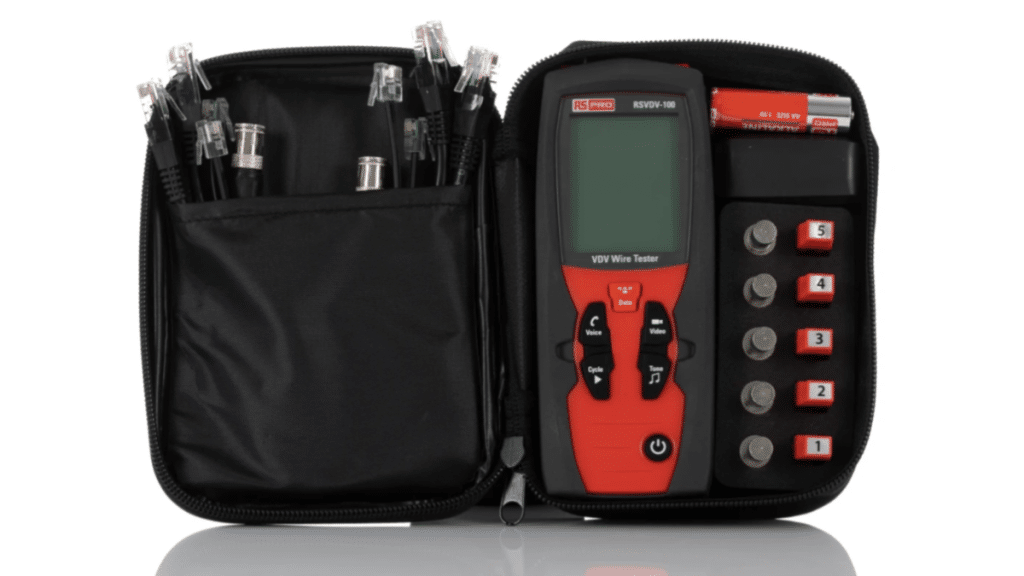
IT technicians play a critical role in maintaining the backbone of modern businesses. From troubleshooting network issues to ensuring secure and efficient connectivity, having the right tools can mean the difference between a quick fix and hours of frustration. Among the essential gadgets, a network tester stands out as a must-have for any technician dealing with wired and wireless networks.
This article explores the top gadgets every IT technician should keep on hand, with a focus on how a network tester helps streamline operations and improve efficiency.
1. Network Tester – The Core of Troubleshooting
A network tester is an essential tool that allows IT technicians to quickly assess the health and connectivity of network cables and devices. Its primary functions include:
- Cable Testing: Determines if Ethernet or other network cables are wired correctly and functioning properly.
- Connectivity Verification: Confirms that devices can communicate over the network.
- Troubleshooting Faults: Identifies broken, miswired, or shorted cables, saving time in repairs.
By using a network tester, technicians can isolate network issues efficiently, reducing downtime and improving overall productivity.
Types of Network Testers
- Basic Cable Testers: Check continuity, wiring order, and simple connectivity.
- Advanced Network Analyzers: Measure network performance, signal strength, and detect issues like packet loss or interference.
- Wireless Network Testers: Assess Wi-Fi coverage, signal strength, and security vulnerabilities.
Investing in a reliable network tester is crucial for IT professionals who want to diagnose problems accurately and quickly.
2. Laptop or Tablet with Diagnostic Software
A portable computer equipped with diagnostic and network management software is indispensable. It allows technicians to:
- Monitor network traffic and performance.
- Run diagnostic tests on servers, switches, and routers.
- Access configuration interfaces and troubleshoot remotely.
Combining a network tester with diagnostic software provides a complete toolkit for resolving complex network issues.
3. Cable Crimping Tools and Connectors
Even the best network tester is useless if cables are damaged or improperly terminated. Cable crimping tools allow technicians to:
- Create custom-length Ethernet cables.
- Replace broken connectors or RJ45 plugs.
- Ensure proper termination for reliable network performance.
Having these tools handy complements the capabilities of a network tester, ensuring end-to-end connectivity.
4. Screwdrivers and Precision Tools
IT technicians often need to open servers, network panels, or desktop cases. A set of screwdrivers and precision tools is essential for:
- Installing or removing components.
- Adjusting racks or mounts.
- Accessing tight spaces without damaging equipment.
Precision tools paired with a network tester help maintain equipment while minimizing downtime.
5. Portable Power Supply and Battery Packs
Portable power sources are vital when working in areas without easy access to electrical outlets. Technicians can:
- Power laptops, routers, or testing devices during site visits.
- Ensure network testers remain operational during fieldwork.
- Support temporary setups for diagnostics and troubleshooting.
A reliable battery pack keeps both tools and devices ready for work anywhere, anytime.
6. Cable Management and Labeling Tools
Proper cable management is key for both aesthetics and functionality. Tools for organizing cables, combined with labeling solutions, allow technicians to:
- Quickly identify connections.
- Reduce tangles and accidental disconnections.
- Maintain neat and organized network setups.
Labeling cables is especially important when working in large server rooms or complex network infrastructures. A network tester then helps verify that each labeled cable functions correctly.
7. Multimeter
While a network tester focuses on connectivity, a multimeter allows IT technicians to check electrical properties such as:
- Voltage levels
- Current flow
- Continuity
This is essential when diagnosing power-related network issues or ensuring proper grounding and surge protection.
8. External Storage Devices
Carrying external storage, such as portable SSDs or USB drives, is vital for:
- Saving diagnostic reports
- Installing software updates
- Backing up critical configurations
These devices complement the use of a network tester by storing results, logs, and other important data for troubleshooting and reporting.
9. Headsets and Communication Devices
Efficient communication is critical, especially in large network environments. Headsets and two-way communication devices help technicians coordinate with team members or remote IT support while performing hands-on troubleshooting.
10. Portable Toolkit and Bag
Finally, having a well-organized toolkit bag ensures all essential gadgets, including the network tester, are easily accessible. A structured toolkit reduces the time spent searching for tools and ensures technicians are prepared for any situation, from quick fixes to major network repairs.
Conclusion
For IT technicians, being equipped with the right gadgets is essential for efficiency, accuracy, and professionalism. A network tester is at the heart of this toolkit, enabling fast identification of network issues, cable faults, and connectivity problems. Complementary tools such as crimping kits, diagnostic laptops, multimeters, and portable power supplies ensure that technicians can handle a wide range of challenges in both office and field environments.
Investing in these essential gadgets not only improves problem-solving efficiency but also enhances service quality, minimizes downtime, and ensures networks remain reliable and secure. For any IT professional, having a network tester alongside these supporting tools is the cornerstone of a well-prepared and productive workflow.