

The article was written and edited by Olena Zinkovska from Stripo
Generative AI is changing a lot today. Earlier, you could spend hours trying to get out of a writing slump, and now, AI can help you brainstorm ideas, draft copy, create images, and outline campaign flows in minutes. According to a recent report, marketers mostly use AI for email content generation (59%), personalization (33%), and subject line and send time optimization (31%).
In this article, we’ll explore how to use generative AI throughout the email-creation process. You’ll walk through numerous processes, from generating subject lines and writing copy to designing visuals and building email sequences, to learn how to use AI to maintain the quality and authenticity your audience deserves.
Generative AI for copywriting
Let’s face it, good writing is time-consuming and often scares us with this blank page. GenAI easily deals with this issue, as it can produce a decent draft in seconds if your prompt is good enough.
But it doesn’t mean that you should copy-paste everything AI generates. Think of your favorite AI tools as creative partners that help you brainstorm ideas, overcome writer’s block, and produce content faster, so you can focus on refining the message.
- Better your prompts
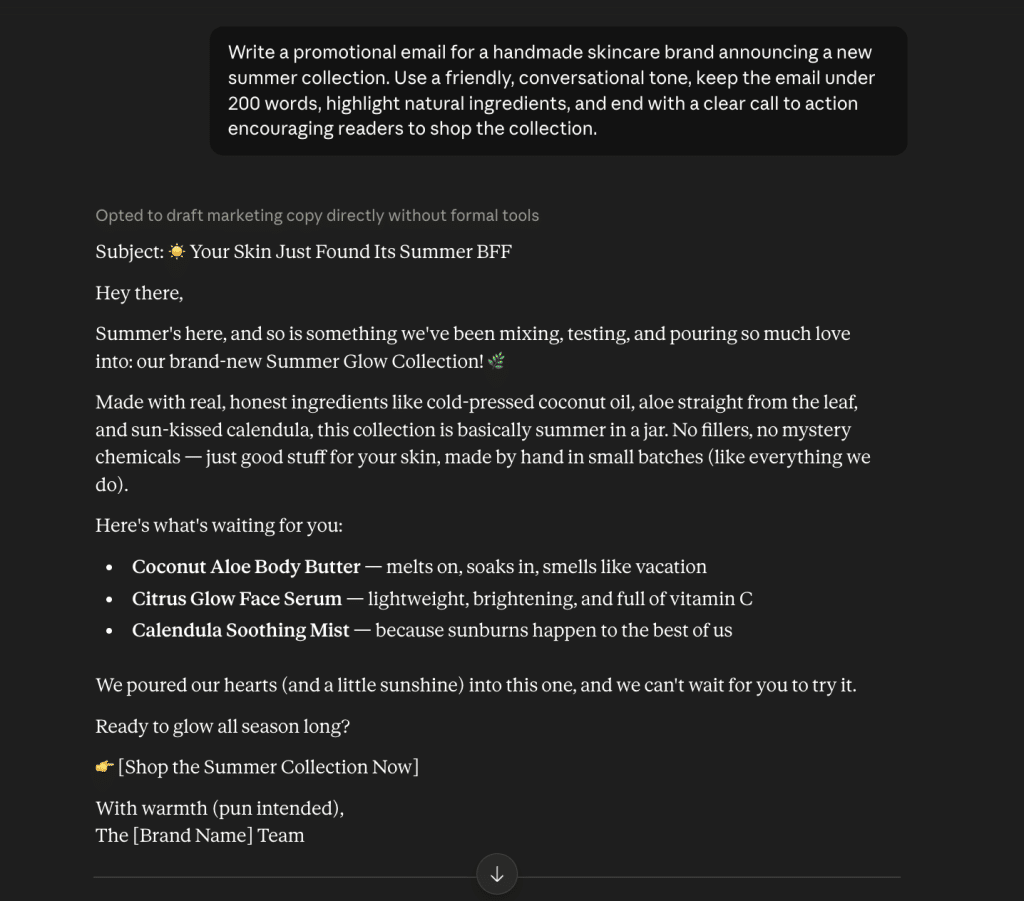
The quality of the copy that AI generates depends heavily on you. Vague instructions will yield dull text, while strong prompts that include your company context, campaign goal, and target audience information will produce content that feels much closer to what you’d write yourself. It’s also a good idea to add the email length, preferred structure, or even words and phrases to avoid.
A prompt “Write a promotional email” won’t make your campaign a success. Think about it more like:
- Encourage opens with subject lines
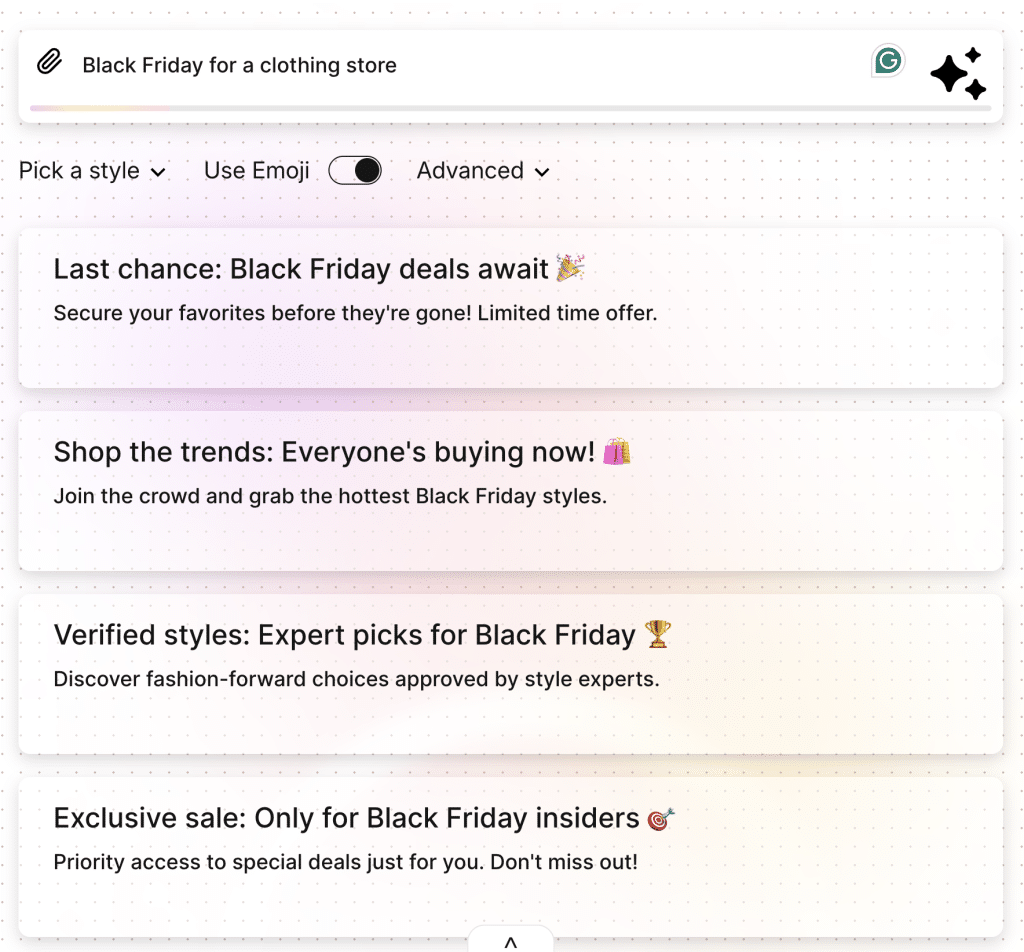
Subject lines need creativity, multiple variations, and constant testing, so it’s one of the easiest ways to dip your toe into using AI. It can quickly generate subject lines with different approaches, such as curiosity, urgency, personalization, or benefit-driven messaging. You’ll get lots of ideas to test, and it won’t repeat the same formulas across campaigns.
An AI email subject line generator can produce options tailored to different tones or audiences. It won’t replace your judgment, but it will expand your options and speed up the creative process.
(Source: Stripo)
- Build stronger body copy
AI can also draft complete email bodies for every stage of the customer journey, including:
- Welcome emails
- Product announcements
- Promotional campaigns
- Abandoned cart reminders
- Post-purchase follow-ups
- Review requests
- Re-engagement campaigns
But don’t make do with the first draft as the final version. Does the copy reflect your brand voice? Are you sure it communicates the right message? Does it include a clear call to action? A few minutes of human editing can turn an AI-generated draft into a personal, trustworthy email.
- Keep your brand voice consistent
AI copy can sound dull and generic, but this problem is avoidable. The tool should be aware of your company context and writing style. Feed AI with examples of your human-written content, describe your tone, and include any writing guidelines you stick to. These instructions help AI generate content that’s much closer to your voice.
Consistency beats perfection every time. Your recipients should recognize your content among the pile of newsletters from the way you communicate with them (regardless of whether the first draft was written by a person or generated with AI).
GenAI in design and layout creation
Besides copywriting, AI can also help you with image and layout generation. Just like copywriting, it works best as a starting point rather than as a finished solution. AI’s goal here is still to free designers’ time to refine creative ideas.
- Create visuals faster
AI image generation tools can help produce:
- Hero banners for promo campaigns
- Product images and lifestyle visuals
- Background graphics and textures
- Icons and decorative elements
- Concept mockups for new campaigns
If you don’t have an in-house design team, these assets can save you lots of production time and money. Your marketers can quickly generate visuals that match a campaign’s theme and adapt them as needed.
That said, don’t forget to check all generated visuals before use. Check for inconsistencies, incorrect details, and strange objects.
- Use AI to structure your emails
Attractive imagery won’t magically make your emails successful. Good emails should guide recipients to the actions you want them to take.
Here, GenAI can help you by suggesting logical sections, content hierarchy, headline placement, and CTA positioning. It’s much easier to turn a collection of ideas into an email that is easy to scan and navigate.
For example, for a product launch email, AI can recommend a structure like:
- A compelling hero section
- A brief intro highlighting the customer’s problem
- Key product benefits
- Customer testimonials or social proof
- A clear CTA
It’s a decent foundation marketers should refine based on their goals and audience.
Building entire email campaigns with GenAI
If you already use GenAI to build separate emails, it’s time to embrace its real value by planning and creating entire campaigns. Thus, AI will perceive your emails not as different projects but as a single system to build connected customer experiences.
- Plan campaign flows efficiently
AI is great at organizing information into logical sequences. Don’t ask it to write a promo email; use it to develop a full-fledged campaign instead.
For example, a welcome series might include:
- Email 1: Welcome new subscribers and introduce your brand.
- Email 2: Show what makes your products unique and how they can solve subscribers’ pains.
- Email 3: Showcase your best-selling products or services.
- Email 4: Build trust with customer reviews, testimonials, or success stories.
- Email 5: Encourage the first purchase with a limited-time offer or discount.
Equipped with your company context and writing style, AI will generate a draft for each message while maintaining a consistent tone and moving people toward conversion.
- Adapt messaging for different audiences
Sending all of your subscribers the same emails is a bad idea. New subscribers seeing your brand for the first time in their lives need different messaging than loyal buyers or inactive ones. When you define your customer segments, GenAI can tweak your emails to reflect each group’s needs, interests, and stages in the customer journey.
For example, it’s easy to rewrite the same product announcement to:
- Introduce the product to new subscribers
- Highlight advanced features for existing customers
- Encourage repeat purchases from loyal shoppers
- Re-engage subscribers who haven’t opened recent emails
It’s a win-win: Marketers don’t have to rewrite emails for different audiences manually but still deliver relevant messages.
- Let AI handle repetitive work, not strategy
GenAI is definitely a powerful tool to structure campaigns, brainstorm ideas, and generate content, but don’t let it determine your marketing strategy.
There’s nothing better than human knowledge to answer these questions:
- What business goal are we going to achieve?
- Which customer segment should get this campaign?
- What action do we want readers to take?
- Does this campaign reflect our brand values?
AI is your execution partner, not a strategist. Use it to speed up processes, suggest ideas, and minimize mundane tasks. But make sure real people are responsible for understanding customers, making business decisions, and creating campaigns that build lasting relationships. “Co-exist” with AI to build campaigns faster, but never sacrifice your authenticity and strategic thinking.
How to ensure quality and compliance
Faster email production is an amazing benefit, but the speed shouldn’t come at the cost of quality. You should review each AI-generated email and image before they reach your subscribers. Such an approach will minimize errors and protect your brand reputation.
- Optimize for deliverability
AI can help you craft a successful email, but it won’t put it in the subscribers’ inboxes. Review your message for some issues that can affect inbox placement:
- Too promotional or misleading language
- Excessive capitalization or punctuation
- Broken or unnecessary links
- Unbalanced text-to-image ratios
- Inconsistent formatting
It’s always a good idea to run your emails through a deliverability or spam check before sending. Thus, you’ll spot potential issues and improve your deliverability chances.
- Review design and accessibility
Did you know that 1.3 billion people experience a significant disability? And some of them might be your subscribers. Besides being well-designed and informative, your emails should also be easy to read and navigate.
Before launching your campaign, make sure that:
- Images have descriptive alt text.
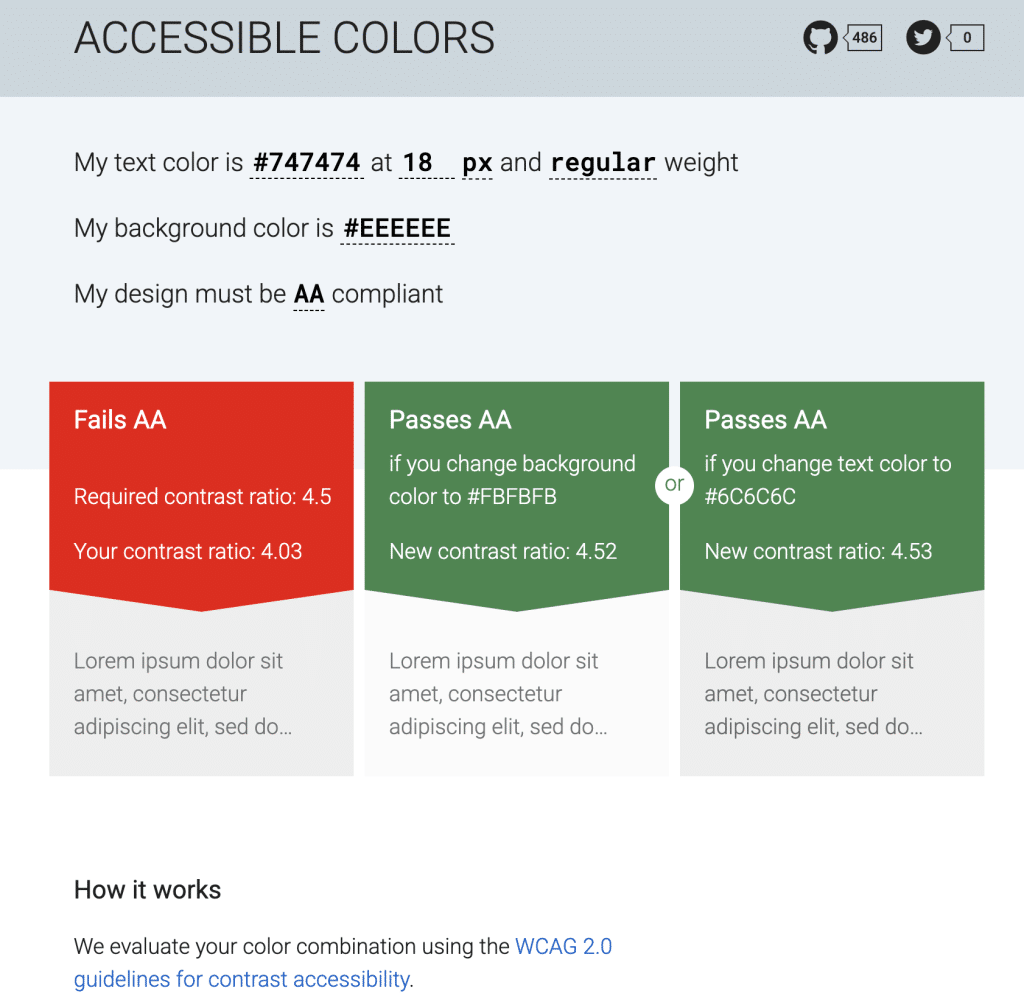
- The text has sufficient color contrast.
- Buttons are clearly labeled and easy to tap on mobile devices.
- Headings create a logical content hierarchy.
- The email displays correctly across desktop and mobile devices.
(Source: Accessible Colors)
Remember that accessibility benefits every subscriber, not just those using assistive technologies. And everyone deserves a comfortable email experience.
- Check legal and privacy requirements
Global email compliance has region-specific ground rules (GDPR/PECR, CAN-SPAM, CASL, Australia’s Spam Act, and Brazil’s LGPD). AI doesn’t automatically know which regulations apply to your business, so make sure a human reviews compliance.
Before sending a campaign, check that your email has:
- A clear unsubscribe option
- Accurate sender information
- Required disclosures for promo content, where applicable
- Compliance with relevant privacy and email marketing regulations in the regions where your subscribers are located
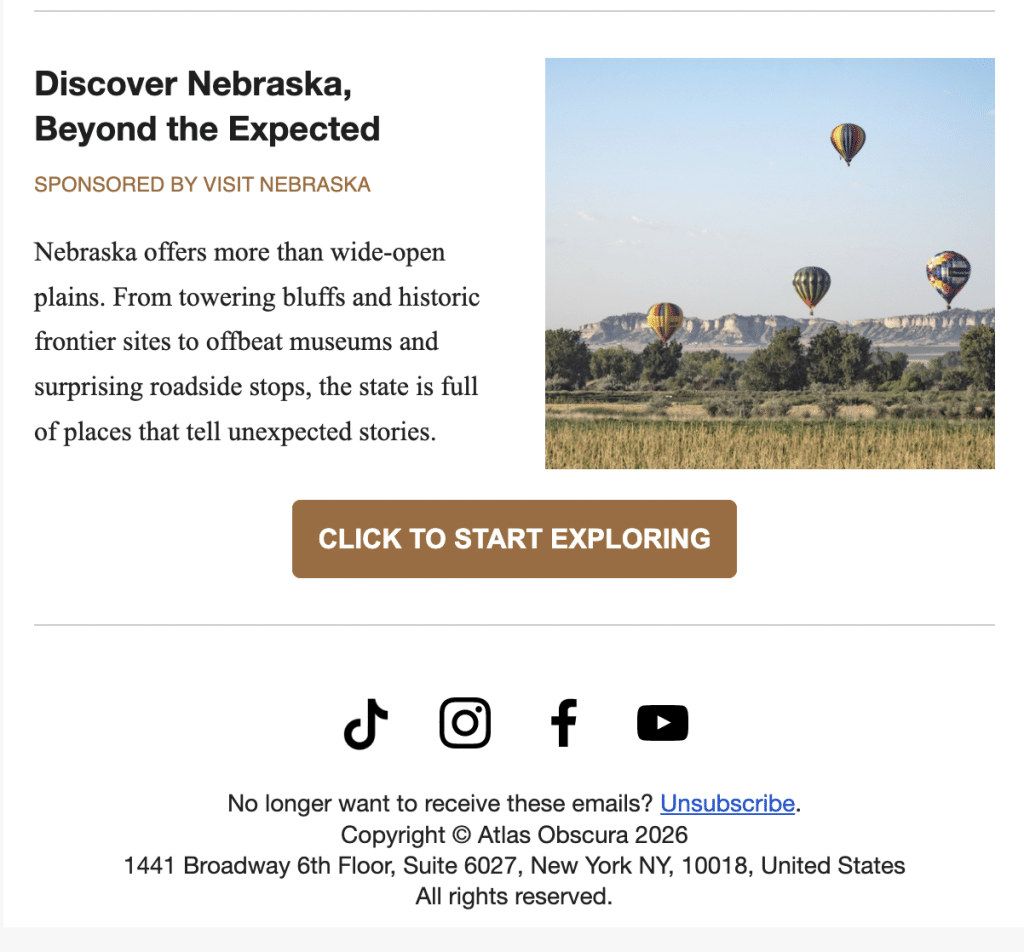
(Source: Email from Atlas Obscura)
It’s easier to build compliance into your review process to protect your business while cultivating trust with your audience.
Wrapping up
GenAI is changing email marketing, but successful teams don’t rely on it to make decisions for them. They use it to minimize mundane tasks and focus on understanding their customers, developing creative campaigns, and building lasting relationships.
But always remember that GenAI works its magic when it’s paired with human expertise and creativity. Don’t skip the review process and make sure your emails are accurate, on-brand, and accessible.
FAQ
- Can AI create an entire email marketing campaign?
Yes, AI tools can craft full email campaigns with subject lines, email copies, campaign sequences, and visuals. You still need human review to clarify goals, check content, maintain brand consistency, and ensure emails support the customer journey.
- How can I make AI-generated emails sound more human?
The best way to make AI sound human is to “feed” it as much company context as possible. Add information about your audience, brand voice, products, and good copy examples to your prompts. Then, edit the generated draft to add your brand’s personality and simplify awkward phrasing.
- Can AI generate images for email marketing?
Yes. With GenAI tools, you can create email banners, illustrations, product backgrounds, and icons. It’s helpful if you run a small business without a design team. But don’t forget to review all the images and check if they align with your brand guidelines and don’t contain visual inconsistencies.
- What should I review before sending an AI-generated email?
Check that all facts, product details, links, and pricing are valid. Make sure the copy matches your brand voice, the design is accessible on desktop and mobile devices, and the email follows deliverability best practices. Review whether it complies with email marketing and privacy regulations.
Author:
Olena Zinkovska, Editor and Content writer at Stripo
Olena creates engaging, relevant, and valuable content for marketers looking to improve their email marketing efforts with attention-grabbing and meaningful emails. Her work focuses on helping brands create messages that get opened, read, and drive stronger audience engagement.