


Whether you’re catching a flight, commuting, or navigating areas with limited connectivity, watching Netflix offline will bring you much convenience. While Netflix provides an official built-in download feature for select devices, it contains many download restrictions that might influence the user experience. Fortunately, this post will not only provide a full guide on how to watch Netflix offline via the official app, but also offer a more flexible method to download Netflix videos to watch offline. Let’s start!
Download Netflix Video Using Its Built-in Download Feature
As we all know, Netflix offers a built-in download feature within its mobile application. With only a few taps, we can store select movies and episodes on our devices for later viewing without internet access. However, this functionality contains its constraints. For example, the range of downloadable titles is also restricted due to licensing agreements. Additionally, the downloads are encrypted, have expiration dates, and are not transferable between devices.
Supported Platforms: iOS, Android, Amazon Fire tablets, and select Chromebooks.
Steps to Download:
Step 1. Open Netflix on your device and log in to your account.
Step 2. Tap on the Downloads tab at the bottom of the screen.

Step 3. From the title list, tap on the movie or TV show you wish to download.
While this feature suits basic needs, users looking for broader access, higher video quality, or desktop compatibility often find it lacking. That’s where a professional solution like Keeprix Video Downloader becomes indispensable.
Download Netflix Videos from Keeprix Video Downloader
As a powerful Netflix Movie Downloader, Keeprix Video Downloader is a professional tool designed specifically for users who want to save Netflix content without the typical platform constraints. It’s an excellent choice for those who prefer watching on larger screens, managing their own media libraries, or accessing high-resolution downloads.
Key Benefits of Keeprix Video Downloader:
- Download movies or TV shows from Netflix without DRM restriction.
- Supports HD and up to 4K resolution, with options to save in MP4 or MKV formats.
- Save Netflix content permanently without title expiration.
- Watch Netflix videos offline without ad interruption.
How to Use Keeprix Video Downloader:
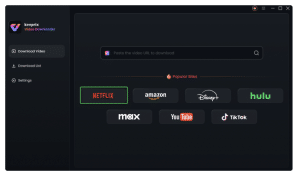
Step 1. Download Keeprix Video Downloader and install it on your PC or Mac. Launch it and choose the Netflix platform.
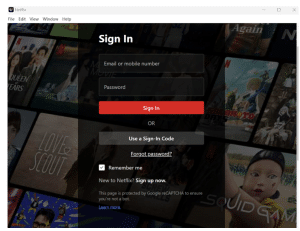
 Step 2. Sign in to your Netflix account within the application.
 Step 3. Use the search bar to find the movie or series you want to watch offline.

Step 4. Click the download button. Wait for the process to be completed.
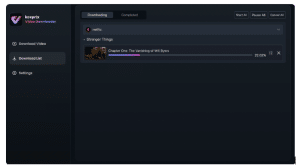
With these steps, users can enjoy their favorite Netflix content offline anytime, anywhere, without internet access.
Conclusion
When it comes to how to watch Netflix offline, you can choose Netflix’s built-in feature to download videos. However, this method has many constraints imposed by the official platform. Considering flexibility, Keeprix Video Downloader is a better solution to watch Netflix content offline. It provides a high-quality Netflix offline viewing experience.